How To Steal Your Competitors' Google Ads Traffic With 3 Conquesting Strategies (Using Free Tools)
TL;DR
There are 3 levels of competitor conquesting in Google Ads, and most advertisers only know about the first one. Level 1 bids on competitor brand names. Level 2 builds custom audiences of people who searched for your competitors and retargets them everywhere. Level 3 uses a hidden Keyword Planner feature to reverse-engineer your competitor’s ENTIRE non-brand keyword footprint, for free. Stack all three and you build a system that intercepts competitor traffic at every stage of the funnel.
In This Post You’ll Learn
- Why your competitors’ customers are your best untapped audience
- How to show your ads when someone searches for a competitor (Search Conquesting)
- How to follow competitor searchers across the web with Custom Segments
- The Keyword Planner hack that reveals your competitor’s non-brand keywords for free
- How to set up your first conquesting campaign in 30 minutes
Why Your Competitors’ Customers Are Your Best Untapped Audience
Someone searches for your competitor by name. They already know the category. They already have intent. They are READY to buy.
And you are nowhere to be found.
That is the single biggest missed opportunity in paid search. Your competitors have spent years (and probably millions of dollars) building brand awareness, running TV spots, and nurturing audiences. Those audiences are actively searching right now, and Google Ads gives you at least three ways to get in front of them.
Most advertisers know about one: bidding on competitor brand names.
Top PPC practitioners use all three. They layer them into a system that intercepts competitor traffic on search, follows those same users across YouTube and Display, and then discovers the exact non-brand keywords competitors are ranking for organically.
Here are all three strategies, from basic to advanced, with step-by-step setup for each.
Level 1: SEARCH CONQUESTING, the Simplest Way to Intercept Competitor Traffic
This is the foundation. The concept is dead simple.
You sell running shoes. Your competitor is Adidas. You want YOUR ad to appear when someone types “Adidas running shoes” into Google.
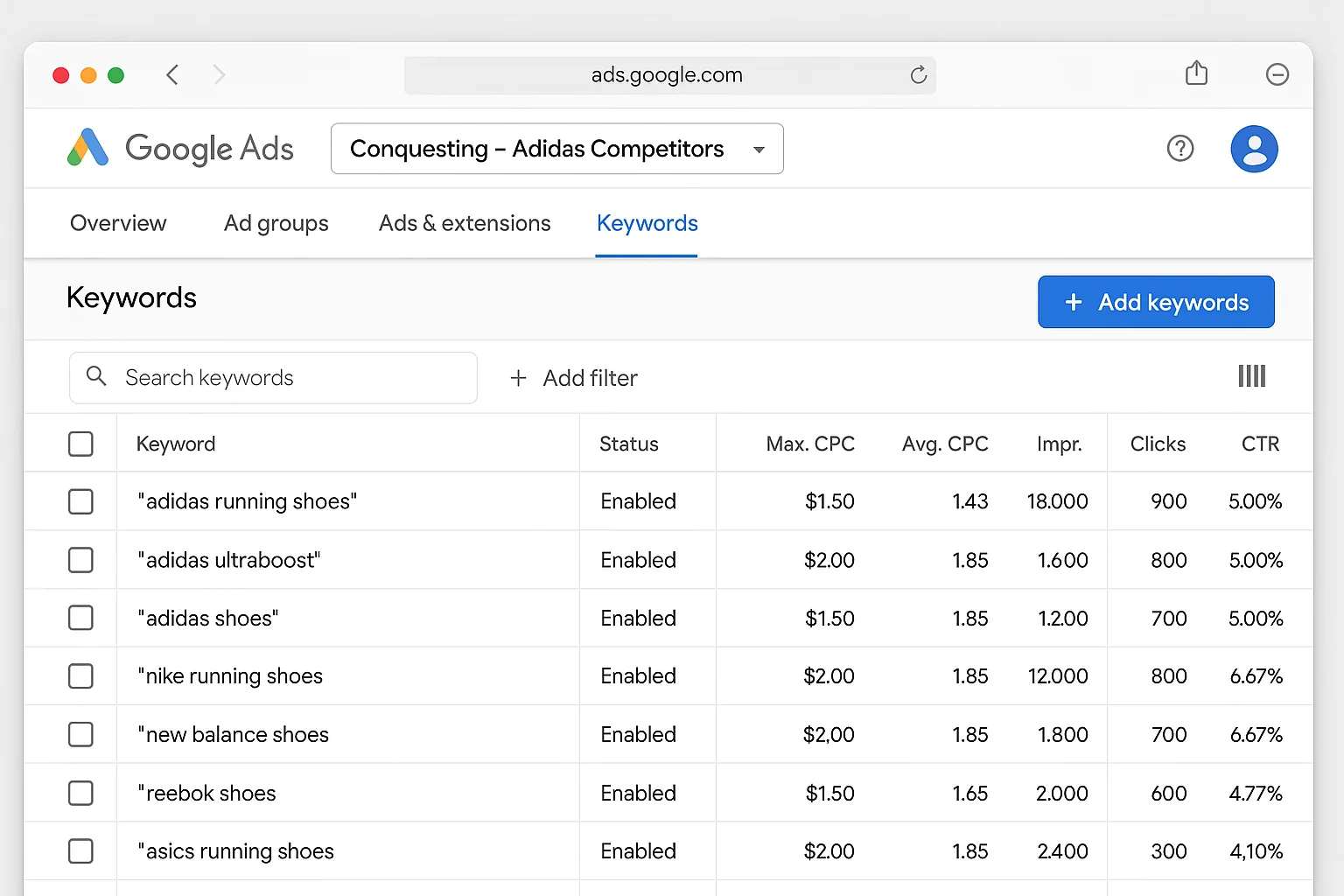
So you add “Adidas running shoes” as a keyword in your search campaign.
That’s search conquesting. When someone searches for Adidas, your Nike ad is eligible to show.
How to Set It Up
-
Create a dedicated Search campaign (or ad group) specifically for competitor terms. Keep these separate from your branded and non-branded campaigns. Mixing them will wreck your Quality Score averages and make performance reporting a mess.
-
Add your competitor’s brand name and brand + product combinations as keywords. Use phrase match or exact match. Broad match will burn budget on irrelevant queries fast.
-
Write ad copy that differentiates. You legally cannot use a competitor’s trademarked name in your ad text (per Google’s trademark policy), but you CAN bid on it as a keyword. Your ad needs to give the searcher a reason to click on you instead.
What to Expect
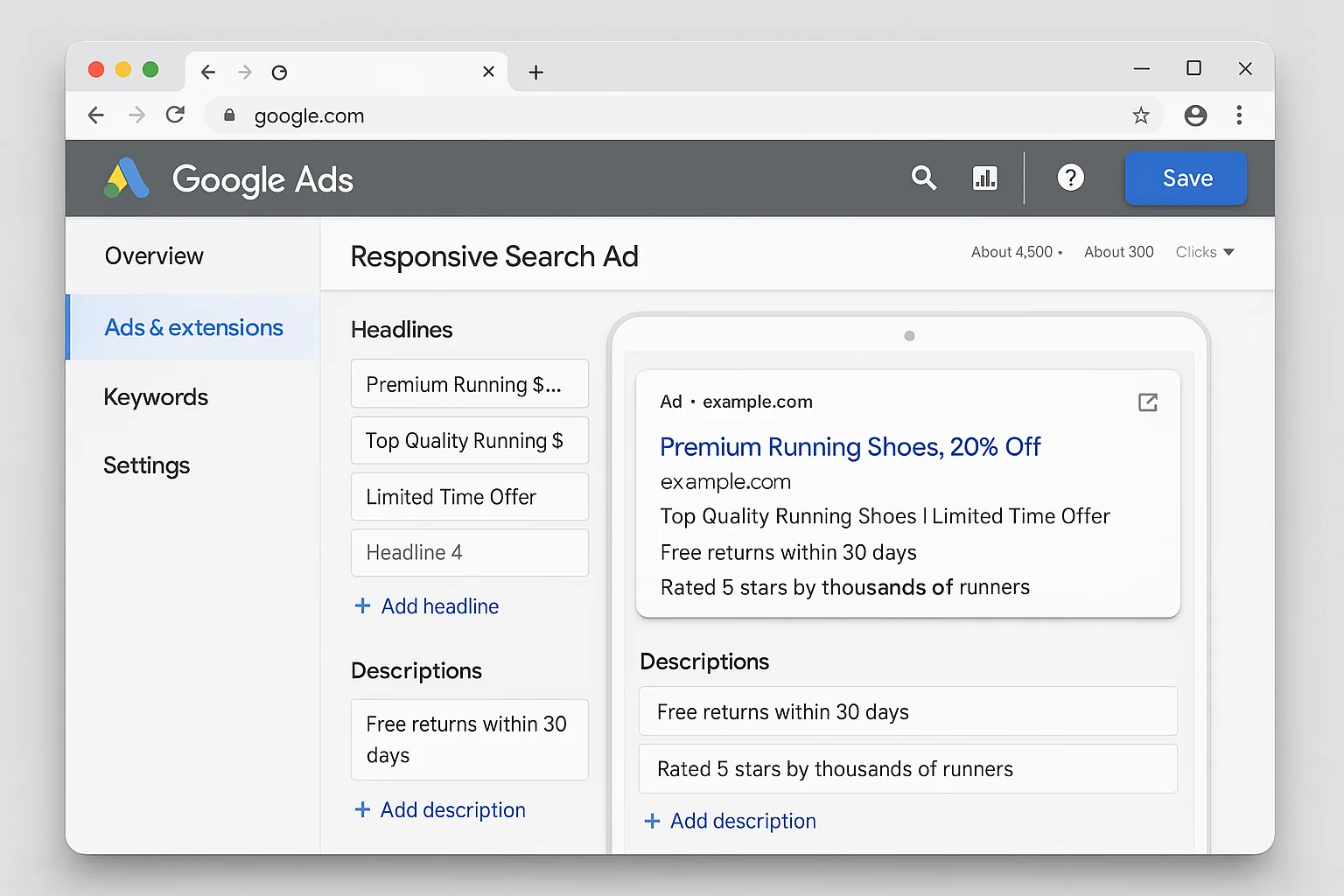
Competitor campaigns almost always have lower Quality Scores than your branded campaigns. Google knows the searcher typed “Adidas” and your landing page says “Nike.” That mismatch tanks relevance.
Expect higher CPCs and lower click-through rates. That is normal. The value of these clicks comes from the intent behind them. Someone searching for a competitor already knows the product category and is in buying mode. If your offer is better, that click converts.
The takeaway: Search conquesting is the entry point. Create a separate campaign, bid on competitor brand + product terms in phrase or exact match, and write ad copy that gives the searcher a reason to choose you. Keep expectations realistic on Quality Score, and judge these campaigns on cost-per-conversion, not CTR.
Level 2: CUSTOM SEGMENTS That Follow Competitor Searchers Across the Web
Level 1 only works at the exact moment someone searches. They type “Adidas running shoes,” your ad shows (or it doesn’t), and the opportunity is gone.
Level 2 extends your reach. It lets you target the same person who searched for your competitor, even after they’ve left the search results page.
Google Ads has a feature called Custom Segments that lets you build an audience based on search behavior. You define the searches, and Google builds the audience.
How to Build a Competitor Custom Segment
-
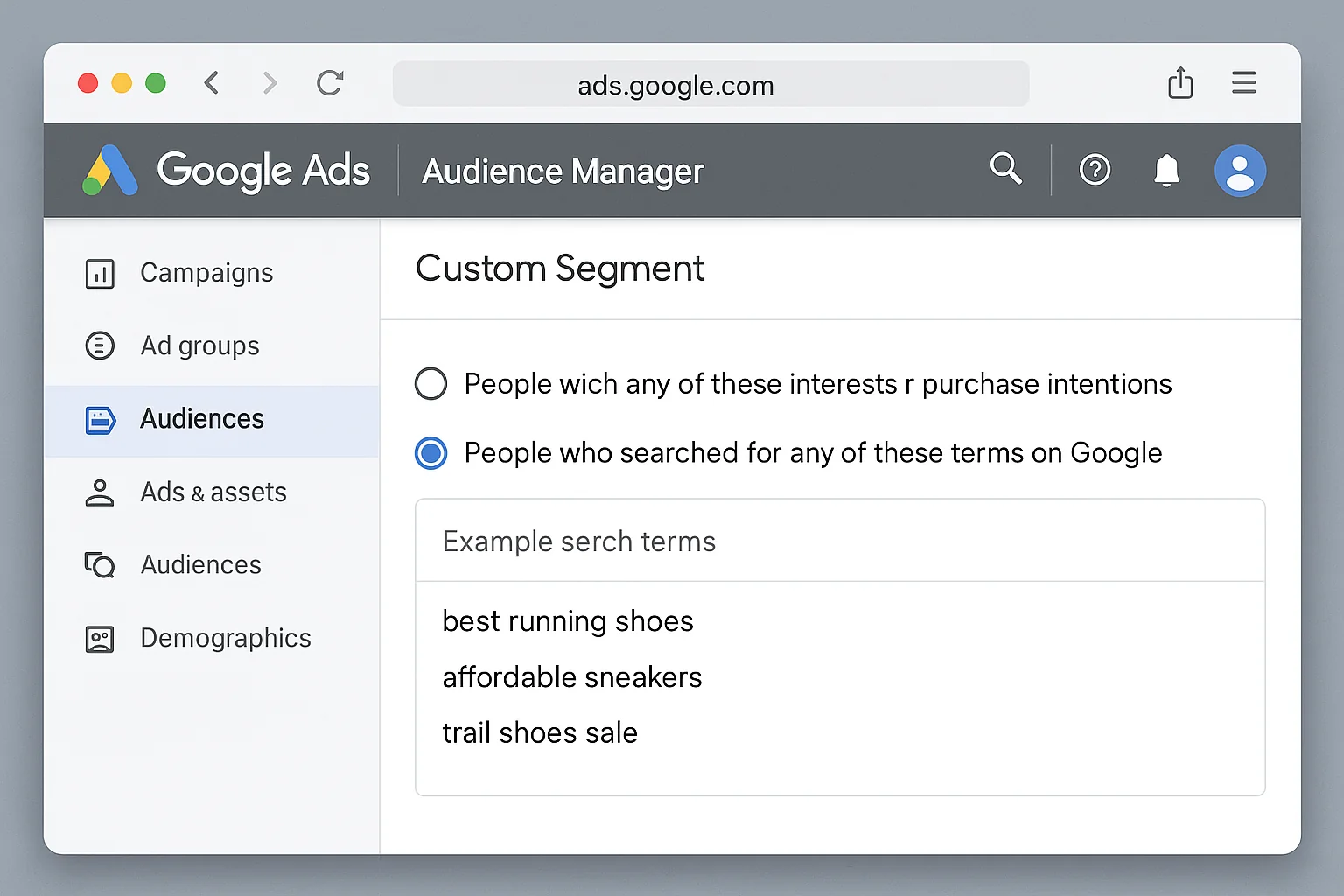
Go to Tools & Settings > Audience Manager > Custom Segments.
-
Click the blue “+” button to create a new segment.
-
Select “People who searched for any of these terms on Google.”
-
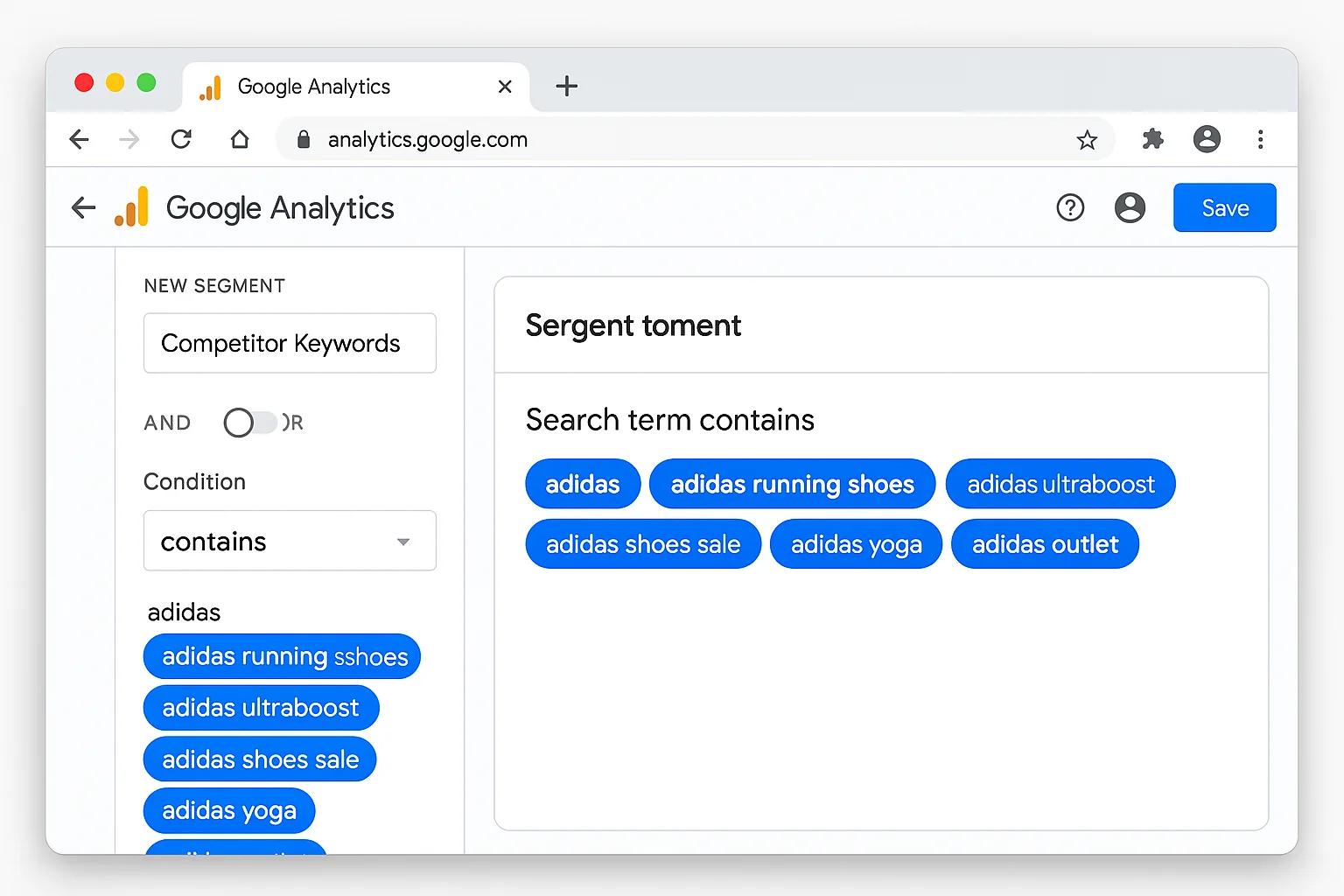
Enter competitor search terms. Go deep here. For the Adidas example, you would add:
- Adidas
- Adidas running shoes
- Adidas Ultraboost
- Adidas shoes sale
- Adidas Yoga
- Adidas outlet
-
Name the segment something clear like “Competitor - Adidas Searchers.”
-
Apply this audience to a Display, YouTube, or Demand Gen campaign.
The magic here is scale. You are no longer limited to the single moment someone searches. You are reaching people who searched for your competitor yesterday, last week, or last month, while they browse news sites, watch YouTube, scroll through Gmail, and use apps.
That person who searched “Adidas running shoes” at 10am is now watching a YouTube video at 8pm. Your pre-roll ad plays. They see your brand. They remember you when they’re ready to buy.
Pro Tips for Custom Segments
Stack multiple competitors into one segment or create separate segments per competitor. Separate segments give you cleaner data on which competitor’s audience converts best for you.
Layer in demographic and interest targeting on top to narrow the audience. “Searched for Adidas” + “interested in marathon running” is a much tighter audience than competitor terms alone.
Test your messaging. Someone who searched for a competitor is already comparison-shopping. Lead with what makes you different, not generic brand awareness copy.
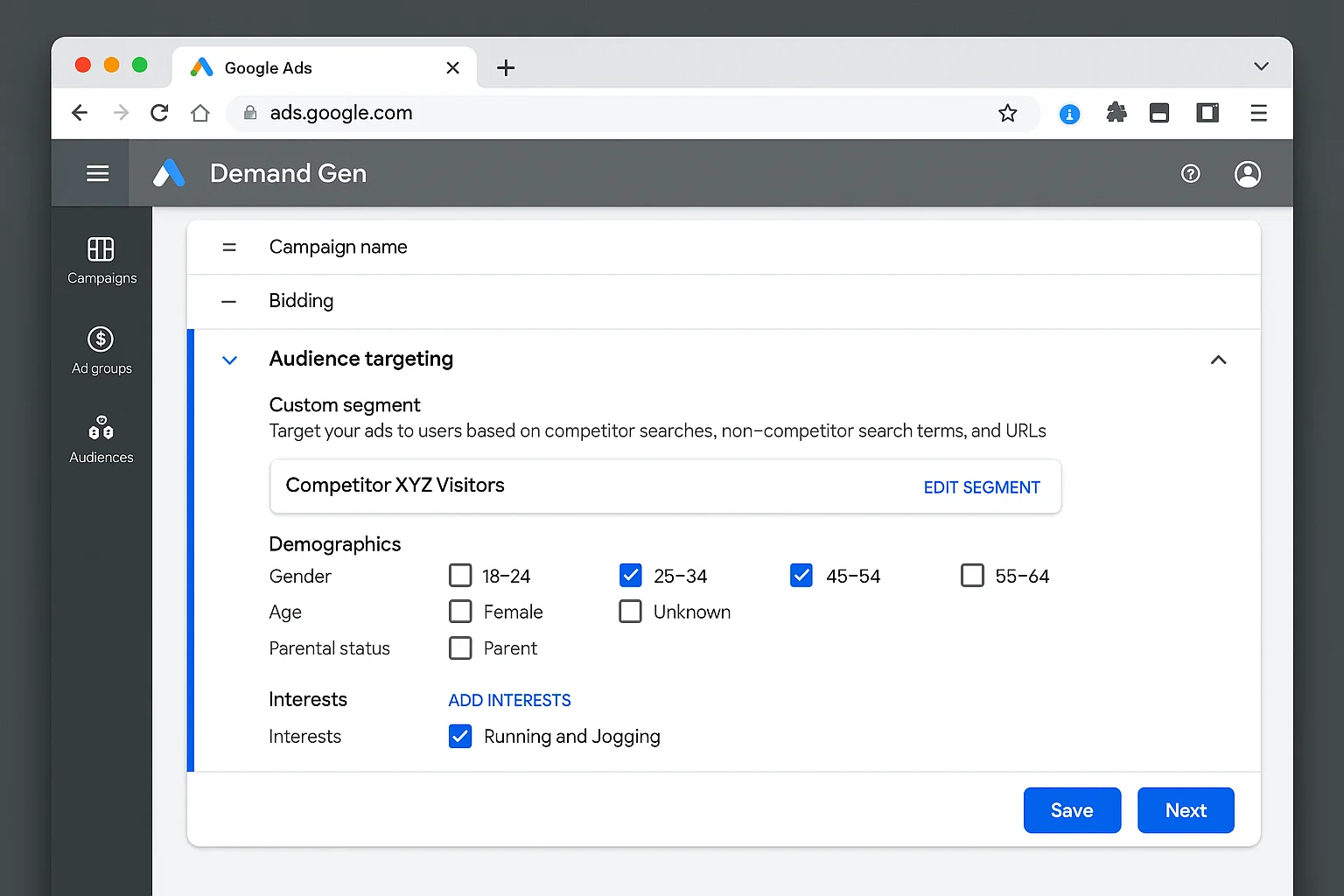
The takeaway: Custom Segments let you turn a single search moment into a long-term retargeting opportunity. Build segments around competitor search terms, apply them to Display, YouTube, and Demand Gen campaigns, and reach those same high-intent users across the entire Google ecosystem.
Level 3: The NON-BRAND CONQUESTING Hack Most Advertisers Never Find
Levels 1 and 2 target people searching for your competitor’s brand name.
Level 3 flips the script entirely. Instead of targeting brand searches, you find the high-intent, non-brand keywords your competitors are already winning on, and you show up there too.
Here is how it works.
Open Google Keyword Planner. Instead of typing in a keyword, click “Start with a website.” Then type in your competitor’s URL.
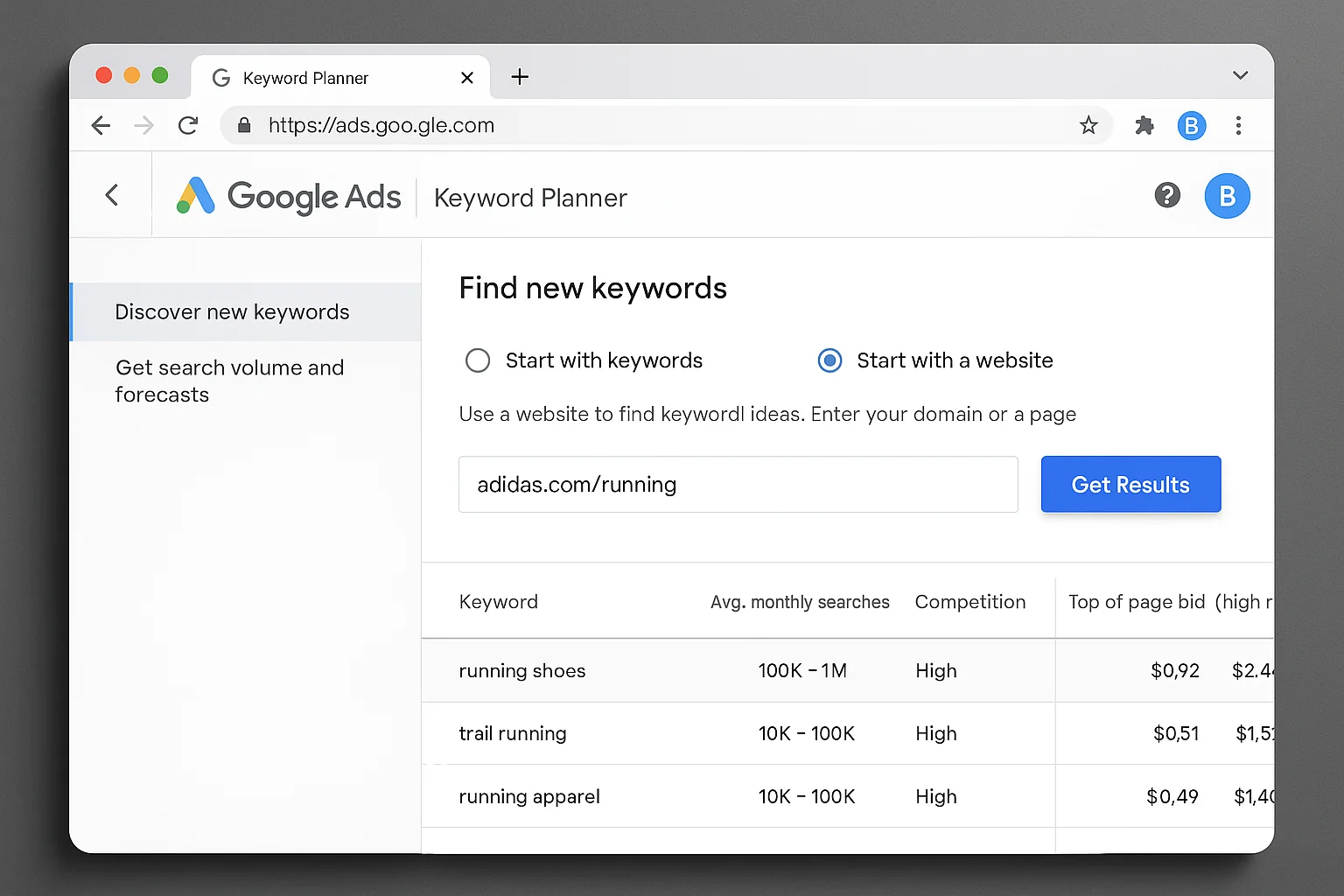
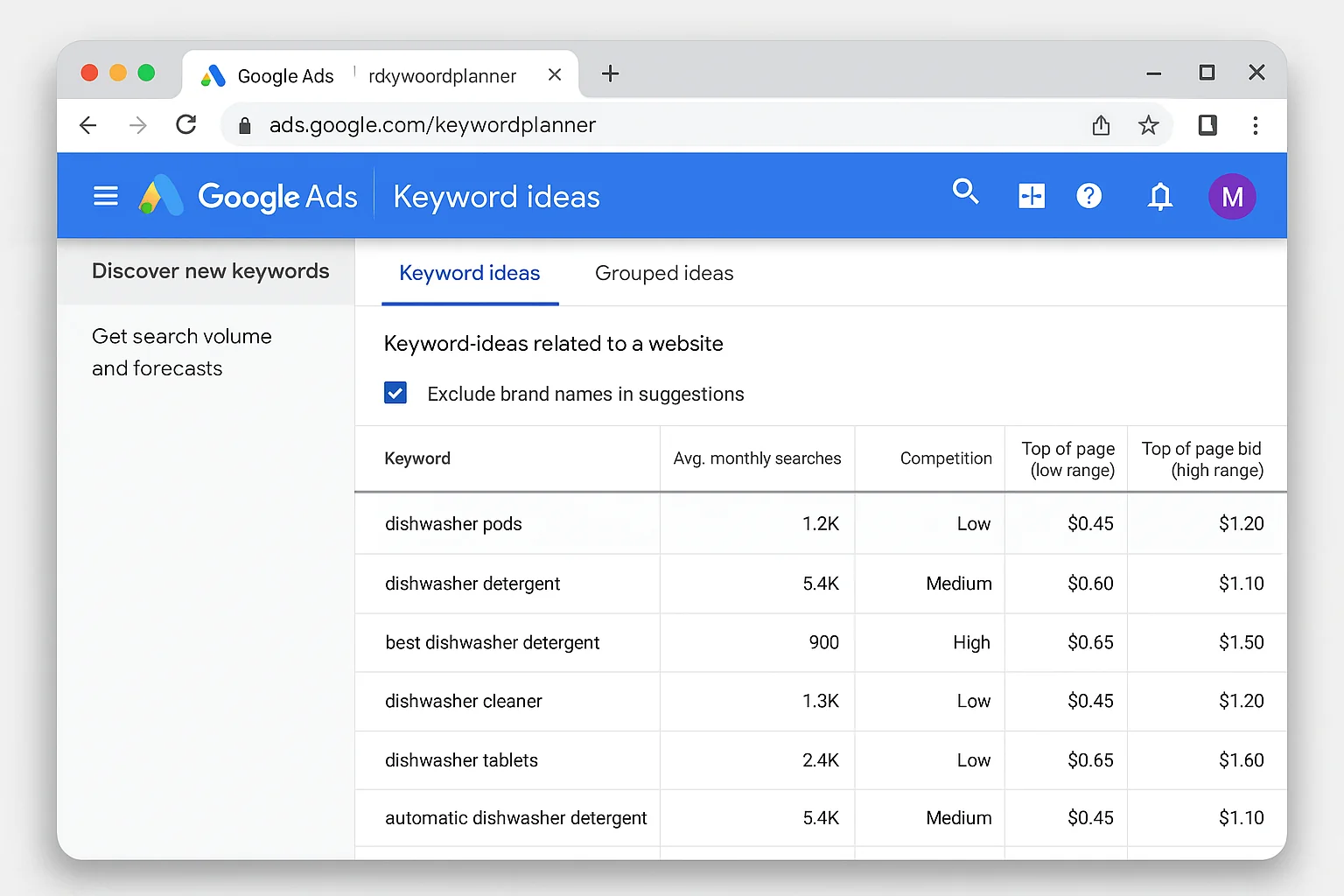
Google crawls that URL and returns a list of keywords it thinks are relevant to that page. These are the searches Google associates with your competitor’s content.
Filter out the branded terms (anything containing “Adidas” in this example). What remains is pure gold: the non-brand keywords your competitor’s website is optimized for.
These are terms like “best running shoes for marathon,” “cushioned running shoes,” and “lightweight trail runners.” Keywords that represent high commercial intent without any brand loyalty attached.
Why This Changes Everything
When you bid on these keywords, something powerful happens.
Your ad shows at the TOP of a search results page where, at minimum, your competitor’s organic results already appear. And if they’re running ads on those same terms, you are now competing directly on their most valuable non-brand keywords.
You’ve essentially reverse-engineered their keyword strategy using a free tool they probably used to build that strategy in the first place.
How to Turn This Into a Campaign
-
Run 3-5 competitor URLs through Keyword Planner’s “Start with a website” feature. Use specific product or category pages, not just the homepage.
-
Export the keyword lists and remove all branded terms.
-
Look for overlap. Keywords that show up across multiple competitor URLs are the highest-value targets. Those are the terms the entire category is competing on.
-
Group the remaining keywords by theme (product type, use case, price range) and build ad groups around each theme.
-
Write ad copy that matches the specific intent of each keyword group. “Best running shoes for marathon” needs different copy than “affordable trail runners.”
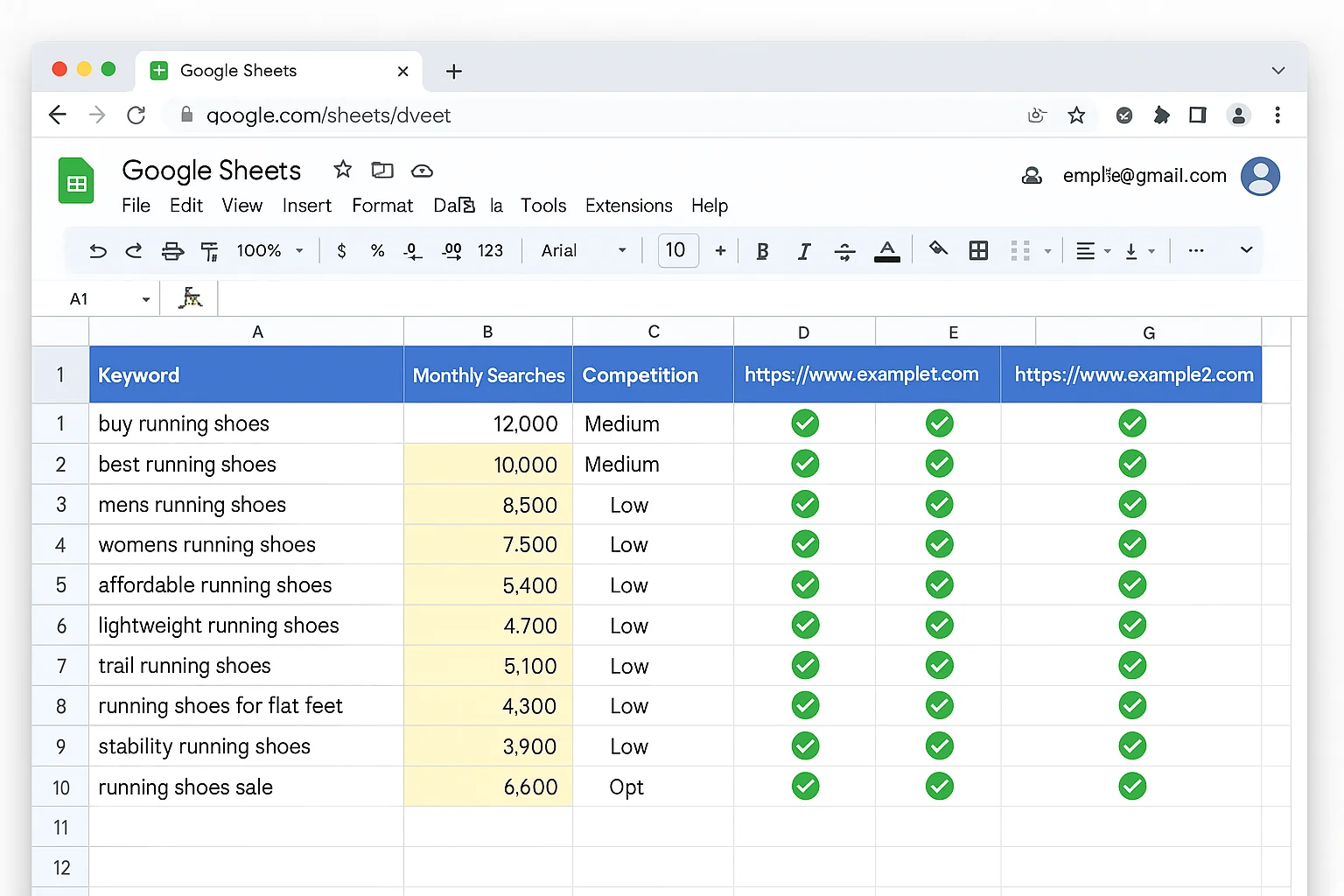
This is the strategy most advertisers completely miss. They know about bidding on competitor names. Some know about Custom Segments. Almost nobody is using Keyword Planner’s URL feature to reverse-engineer competitor keyword strategies.
The takeaway: Open Keyword Planner, enter competitor URLs instead of keywords, filter out branded terms, and you have a free map of every non-brand keyword your competitors are winning on. Bid on those terms and your ad appears on pages where their organic results already rank.
How All 3 Strategies Work Together as a System
Each strategy is powerful on its own. Combined, they create a competitor conquesting system that covers every angle.
Level 1 (Search Conquesting) catches people at the moment of highest brand intent. They searched for your competitor by name. You intercept.
Level 2 (Custom Segments) follows those same people after they leave search. You stay top of mind through Display, YouTube, and Demand Gen.
Level 3 (Non-Brand Conquesting) captures the rest of your competitor’s traffic, the people searching for category and product terms where your competitor ranks organically. No brand loyalty. Pure intent.
Here is what this looks like in practice.
A runner searches “Adidas Ultraboost review.” Your competitor campaign (Level 1) triggers your search ad. They don’t click. No problem.
Your Custom Segment (Level 2) picked up that search. Two hours later, they’re watching a shoe review on YouTube. Your pre-roll ad plays.
Meanwhile, someone else searches “best cushioned running shoes.” They never typed “Adidas” at all, but that keyword came straight from your Keyword Planner competitor analysis (Level 3). Your ad sits at the top. Adidas appears in the organic results below.
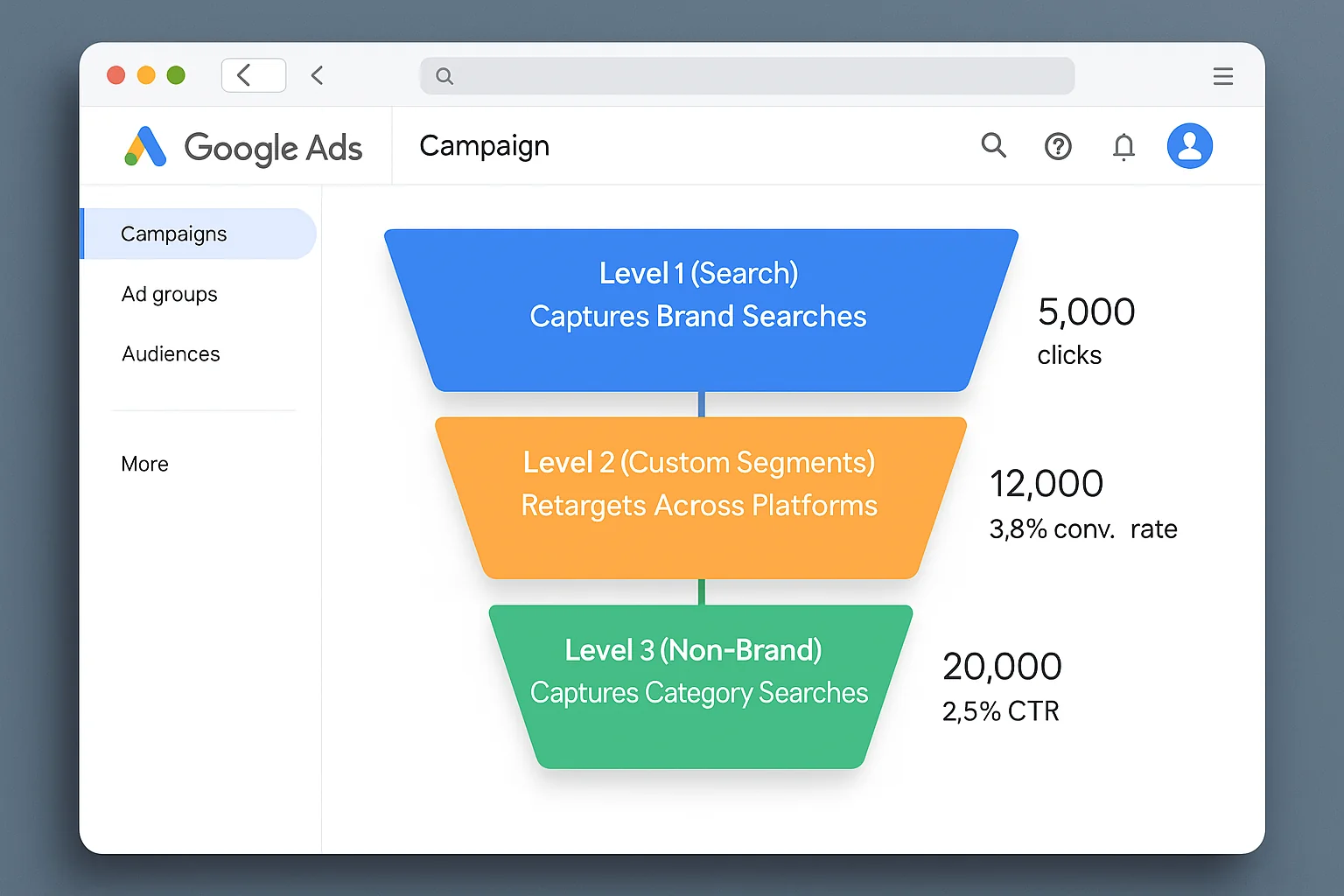
Three strategies. One system. Every path your competitor’s potential customer takes, you’re there.
How to Launch Your First Conquesting Campaign in 30 Minutes
You don’t need to launch all three strategies at once. Start with the one that matches your current setup and budget, then layer on the others.
If you’re starting from zero, here’s the order:
-
Start with Level 1 (Search Conquesting). Pick your top 3 competitors. Add their brand names and brand + product terms as phrase match keywords in a dedicated campaign. Set a daily budget you’re comfortable testing with for 2 weeks. Write ad copy that leads with your strongest differentiator.
-
Add Level 2 (Custom Segments) once you have Display or YouTube campaigns running. Build one Custom Segment per competitor using 5-10 of their branded search terms. Apply the segment as targeting on your existing Display or Demand Gen campaigns. Monitor for 2 weeks and compare conversion rates against your other audience segments.
-
Layer in Level 3 (Non-Brand Conquesting) when you want to scale. Run your top 5 competitors’ product page URLs through Keyword Planner. Export, de-brand, and find the overlap keywords. Build a new Search campaign targeting those non-brand terms. This is where the real scale lives because non-brand search volume is almost always 10x larger than brand search volume.
Budget guidance: Competitor campaigns typically run 15-25% higher CPCs than your core non-brand campaigns. Start with 10-15% of your total Google Ads budget allocated to conquesting, then scale based on cost-per-conversion data.
The takeaway: Start with search conquesting on your top 3 competitors. Layer in Custom Segments when you’re ready for Display and YouTube. Scale with Non-Brand Conquesting when you want volume. Review cost-per-conversion (not CTR) to judge performance.
The Legal Stuff (Yes, You Can Do This)
Quick answer: bidding on competitor keywords in Google Ads is legal.
According to Google’s advertising policies, you can bid on trademarked terms as keywords. You just cannot use trademarked terms in your ad copy (the headline and description text) without authorization from the trademark owner.
This means you can absolutely add “Adidas running shoes” as a keyword. You just can’t write an ad headline that says “Better Than Adidas.”
Search Engine Journal has a thorough breakdown of the trademark rules and edge cases if you want the full legal picture.
The other thing worth knowing: your competitor can see that you’re bidding on their terms. Google’s Auction Insights report shows them who else is competing in their auctions. Some competitors will retaliate by bidding on YOUR brand name. Factor that into your strategy. If you start conquesting, protect your own brand campaigns too.
One More Thing: Measure What Matters
Conquesting campaigns look terrible if you measure them the wrong way.
Your click-through rate will be lower than your branded campaigns. Your Quality Score will be lower. Your CPC will be higher.
All of that is expected.
The only metric that matters for conquesting is cost per conversion. If you’re acquiring customers from competitor searches at a cost that works for your business, the campaign is winning. Period.
Track conversions by campaign. Compare your competitor campaign CPA against your non-brand campaign CPA. If the competitor CPA is within 20-30% of your non-brand CPA, you’ve found a profitable new customer acquisition channel.
According to WordStream’s benchmark data, the average Google Ads conversion rate across industries is 4.40% on search. Competitor campaigns often convert between 2-4%, but the quality of those conversions tends to be high because the searcher already understands the product category.
Go set up your first competitor conquesting campaign this week. Start with Level 1. You’ll have it live in under 30 minutes.
Do it up.