How To Use Google Ads Demand Gen Campaigns for Brand Awareness (With the Maximize Clicks Strategy)
TL;DR
Google Ads Demand Gen campaigns reach over 3 billion users across YouTube, Discover, and Gmail, and almost nobody is using them for brand awareness. By choosing the Maximize Clicks bid strategy instead of a conversion-focused approach, you can drive website visits at $0.30 to $1.50 per click from people in discovery mode. One bid strategy change. That is the entire play, and this post walks through the full setup in 5 steps.
In This Post You’ll Learn
- Why most advertisers are using Demand Gen campaigns wrong
- The Maximize Clicks strategy that makes Demand Gen a brand awareness machine
- How to set up a Demand Gen campaign for awareness (step by step)
- Why YouTube, Discover, and Gmail are perfect awareness placements
- 5 ways to optimize your awareness Demand Gen campaign
- The metrics that actually matter when awareness is the goal
Most Advertisers Use Demand Gen Wrong
Google Ads Demand Gen campaigns for brand awareness are one of the most powerful plays hiding in plain sight inside your ad account.
Here is what happens in most Google Ads accounts. An advertiser opens the campaign creation screen, sees “Demand Gen,” and immediately thinks conversions. They pick Maximize Conversions or Target CPA as the bid strategy, build their ads, and measure success by how many leads or purchases come through.
And that is totally fine if conversions are your goal.
But if your goal is brand awareness, you are leaving one of Google’s best tools on the table.
Demand Gen campaigns reach people across YouTube (including Shorts), Gmail, and the Discover feed. These are places where people are scrolling, watching, and browsing. They are in discovery mode.
They are not typing a search query. They are not comparison shopping. They are open to new things.
That is awareness gold.
The problem is that Google’s own documentation on Demand Gen leads with conversion-focused language. The best practices page recommends conversion-based bidding. The default setup flow pushes you toward conversion tracking.
So most advertisers never even consider Demand Gen for awareness. They run Display campaigns instead, or they default to YouTube video campaigns with CPV bidding.
Both of those work. But Demand Gen with Maximize Clicks works differently, and for awareness goals, it can work better.
Here is why.
The MAXIMIZE CLICKS Strategy That Turns Demand Gen Into a Brand Awareness Machine
The core tactic is simple. Run a Demand Gen campaign with Maximize Clicks as your bid strategy.
That is it. One setting change transforms a conversion-focused campaign type into a brand awareness engine.
Here is the logic. Maximize Clicks is an automated bid strategy that tells Google: “Spend my budget and get me as many clicks as possible.”
Google’s algorithm then optimizes to find the cheapest clicks across all Demand Gen placements. YouTube, Discover, Gmail. Wherever someone is most likely to click your ad at the lowest cost, that is where your budget goes.
Every click means someone left what they were doing to visit your website.
Think about what that means for awareness. Someone was watching a YouTube video. They saw your ad. They clicked. They left the video to come to your site.
Someone was checking their Gmail. They saw your ad in the Promotions tab. They clicked. They left their inbox to visit your site.
Someone was scrolling the Google Discover feed on their phone. Your ad appeared. They tapped. They left the feed to visit you.
That is high-quality awareness. These people did not just see your ad. They took action on it. They visited your site. They now know you exist, what you look like, and what you offer.
And because you are using Maximize Clicks instead of Maximize Conversions, Google is not trying to find people likely to convert. It is trying to find people likely to click. As Search Engine Land’s guide to Maximize Clicks notes, this strategy can be applied to Demand Gen campaigns when you are not ready for Smart Bidding. The audience pool is much larger, the CPCs are typically lower, and you get more total site visits for the same budget.
The takeaway: Maximize Clicks on a Demand Gen campaign gives you the reach of a Display campaign with the engagement quality of a Search campaign. People actually visit your website instead of just seeing a banner they ignore.
How To Set Up a Demand Gen Campaign for Brand Awareness (Step by Step)
Here is the exact setup process. Follow these five steps and you will have a live awareness Demand Gen campaign in under 30 minutes.
Step 1 - Create a New Campaign and Choose Your Objective
Log into your Google Ads account and click the blue “+” button to create a new campaign.
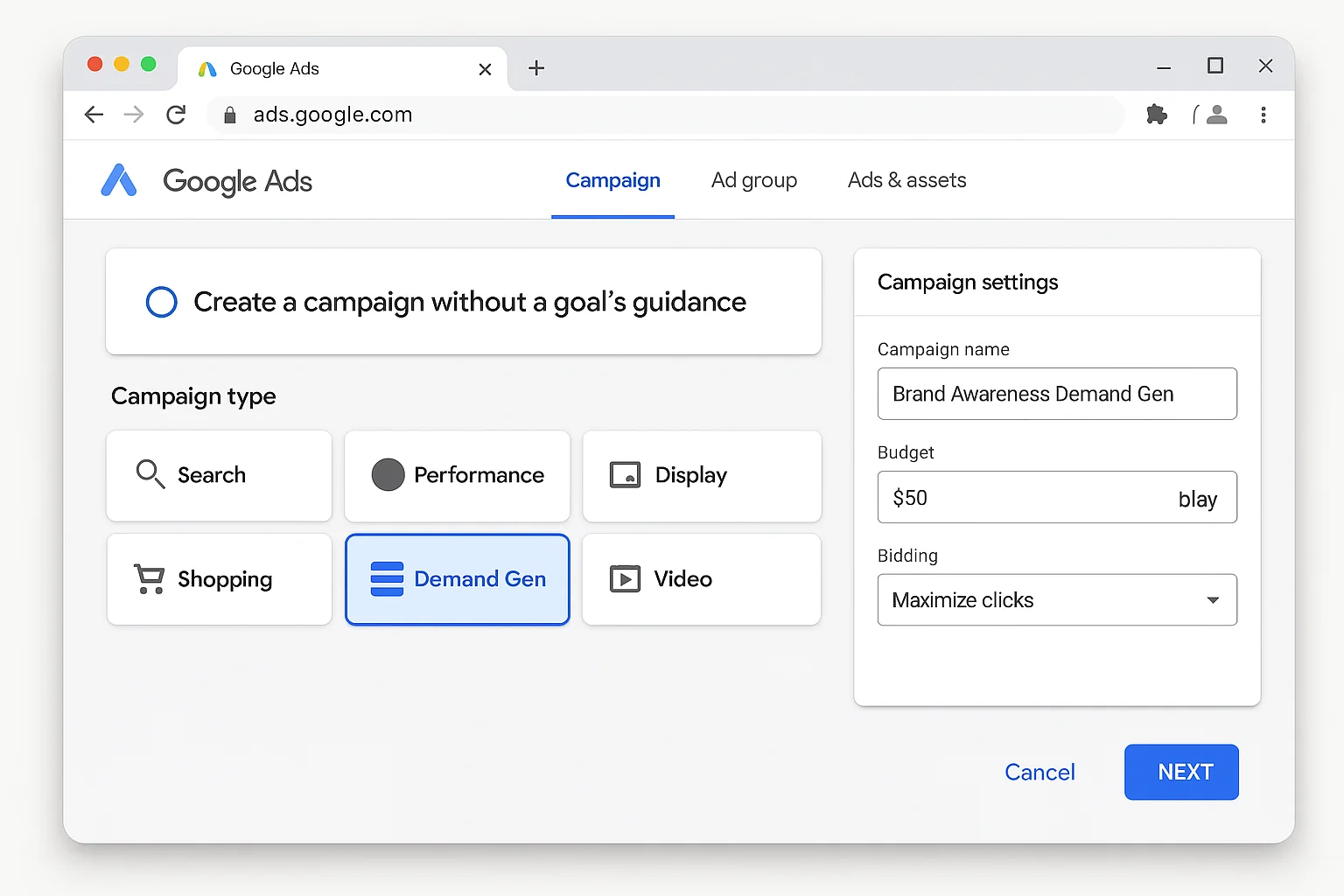
You have two options here. You can select “Brand awareness and reach” as your objective, or you can select “Create a campaign without a goal’s guidance” for full manual control.
I recommend “Create a campaign without a goal’s guidance.” This gives you access to every setting without Google pre-filtering options based on what it thinks you want.
Then select “Demand Gen” as your campaign type.
Step 2 - Select Maximize Clicks as Your Bid Strategy
This is the critical step.
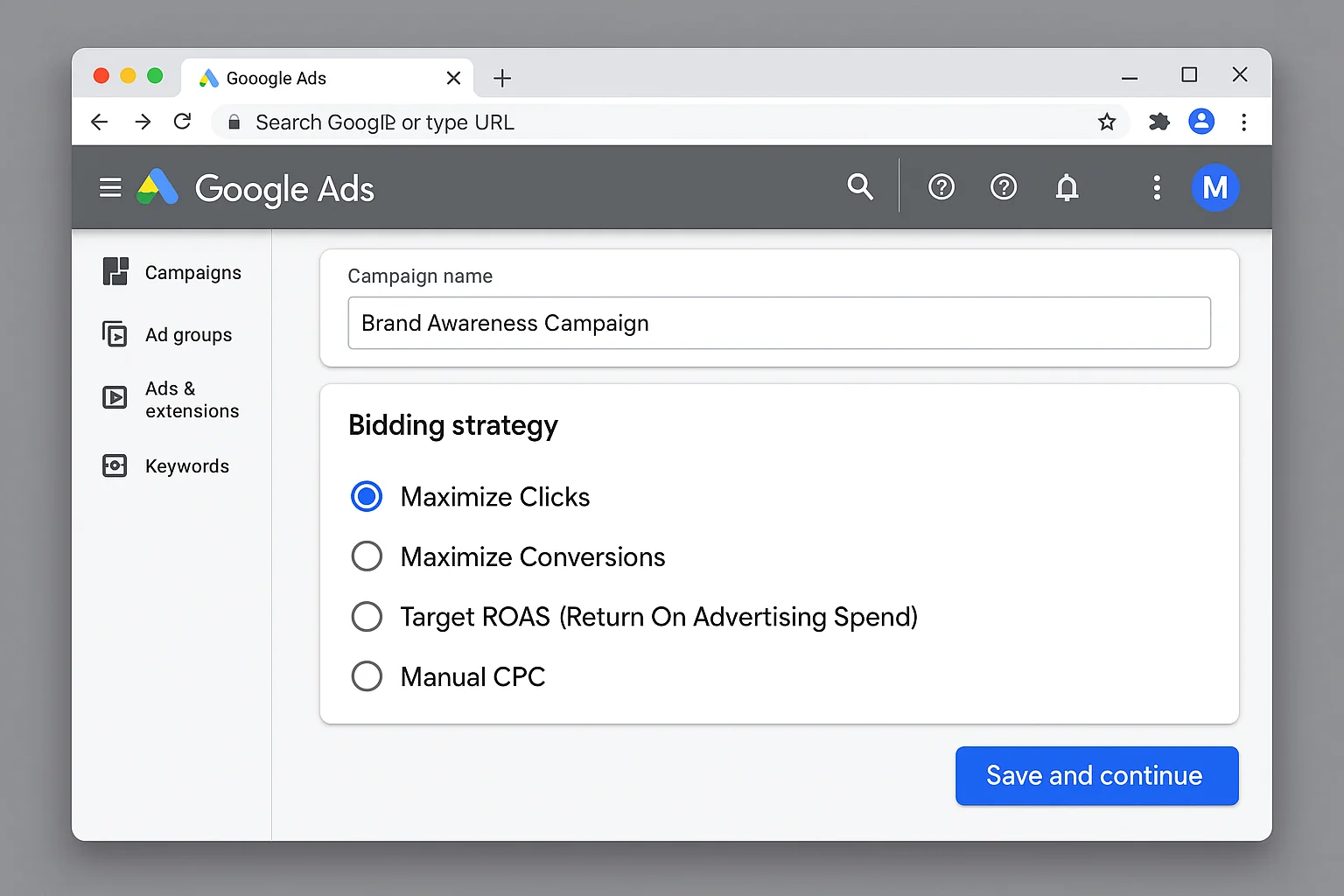
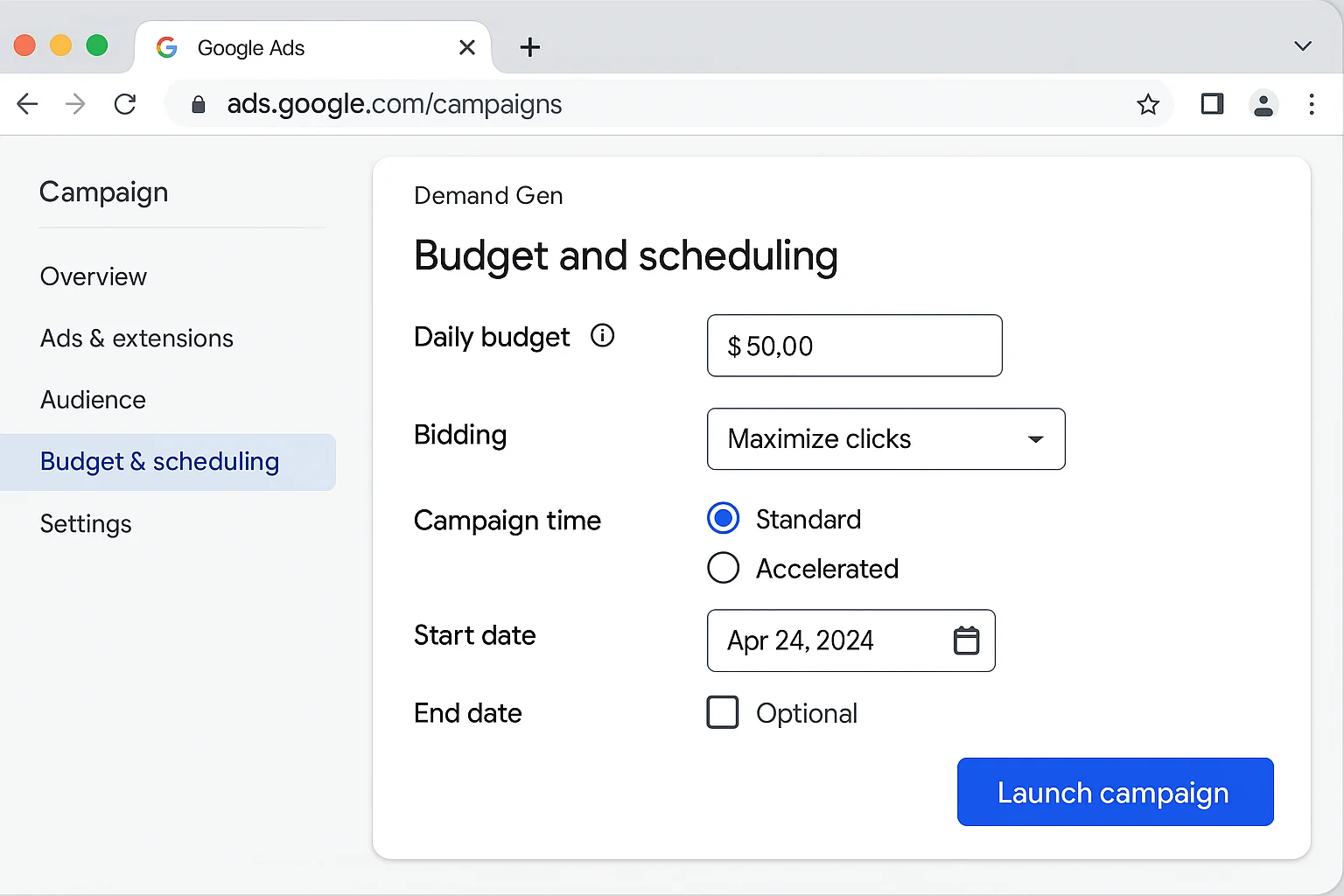
On the bidding screen, select Maximize Clicks.
You will see other options like Maximize Conversions, Maximize Conversion Value, and Target CPA. Ignore them. Those are for conversion campaigns.
For awareness, Maximize Clicks is the move.
You can optionally set a maximum CPC bid limit. This puts a ceiling on what Google can pay per click. If you are just starting out, leave it open for the first week to let Google learn, then add a cap based on your average CPC data.
Step 3 - Build Your Audience Segments
Demand Gen campaigns use audience-based targeting, not keyword targeting. This is a huge advantage for awareness because you can define EXACTLY who sees your ads.
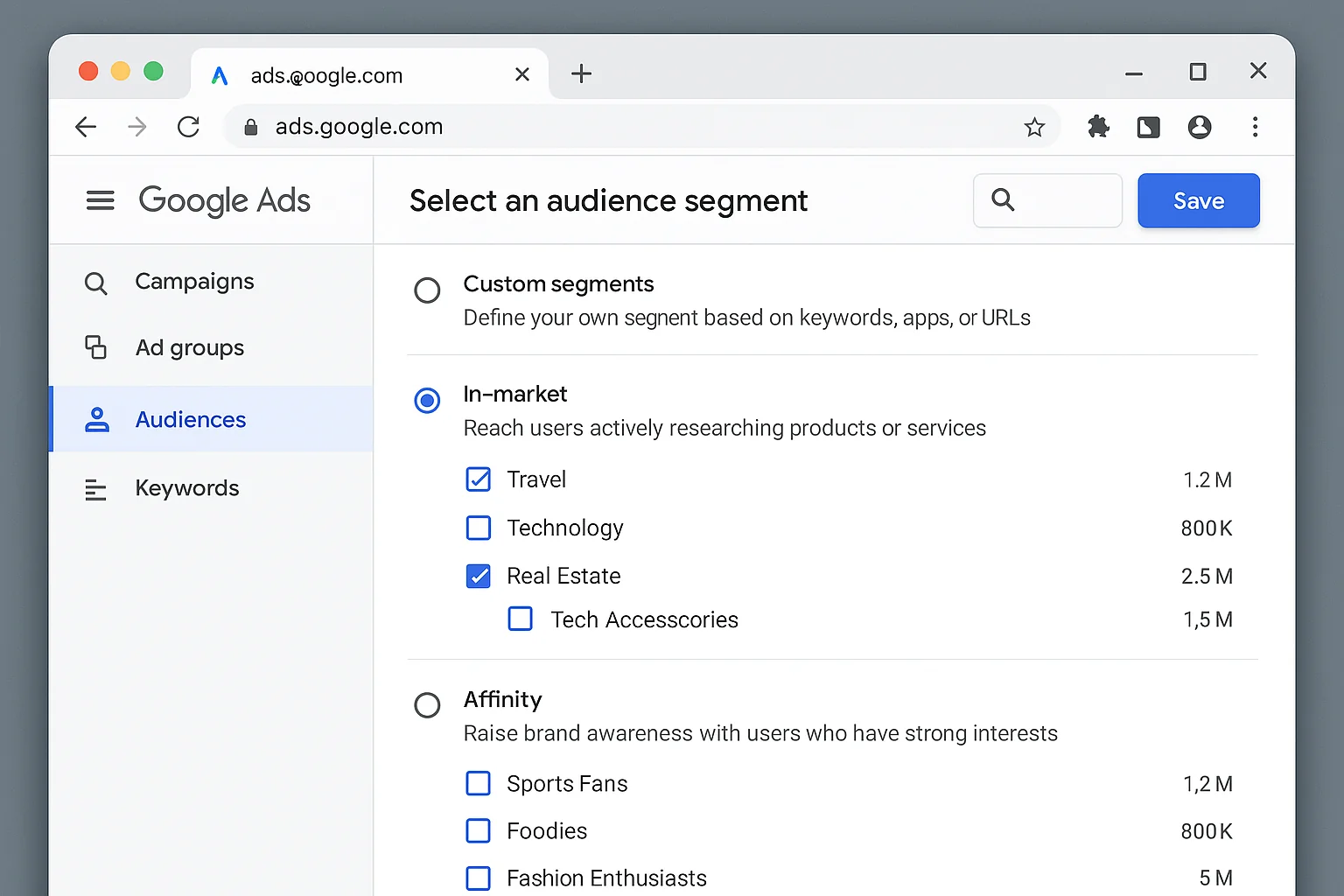
You have several audience options:
- Custom segments: Target people based on search terms they have recently Googled, apps they use, or websites they visit. This is powerful. You can target people who searched for your competitors, your product category, or related topics.
- In-market audiences: Reach people Google has identified as actively researching products or services in your category.
- Affinity audiences: Reach people based on their long-term interests and habits.
- Lookalike segments: Upload a customer list and let Google find similar people.
For brand awareness, I recommend starting with custom segments based on competitor search terms and in-market audiences for your category. This gives you a large but relevant audience pool.
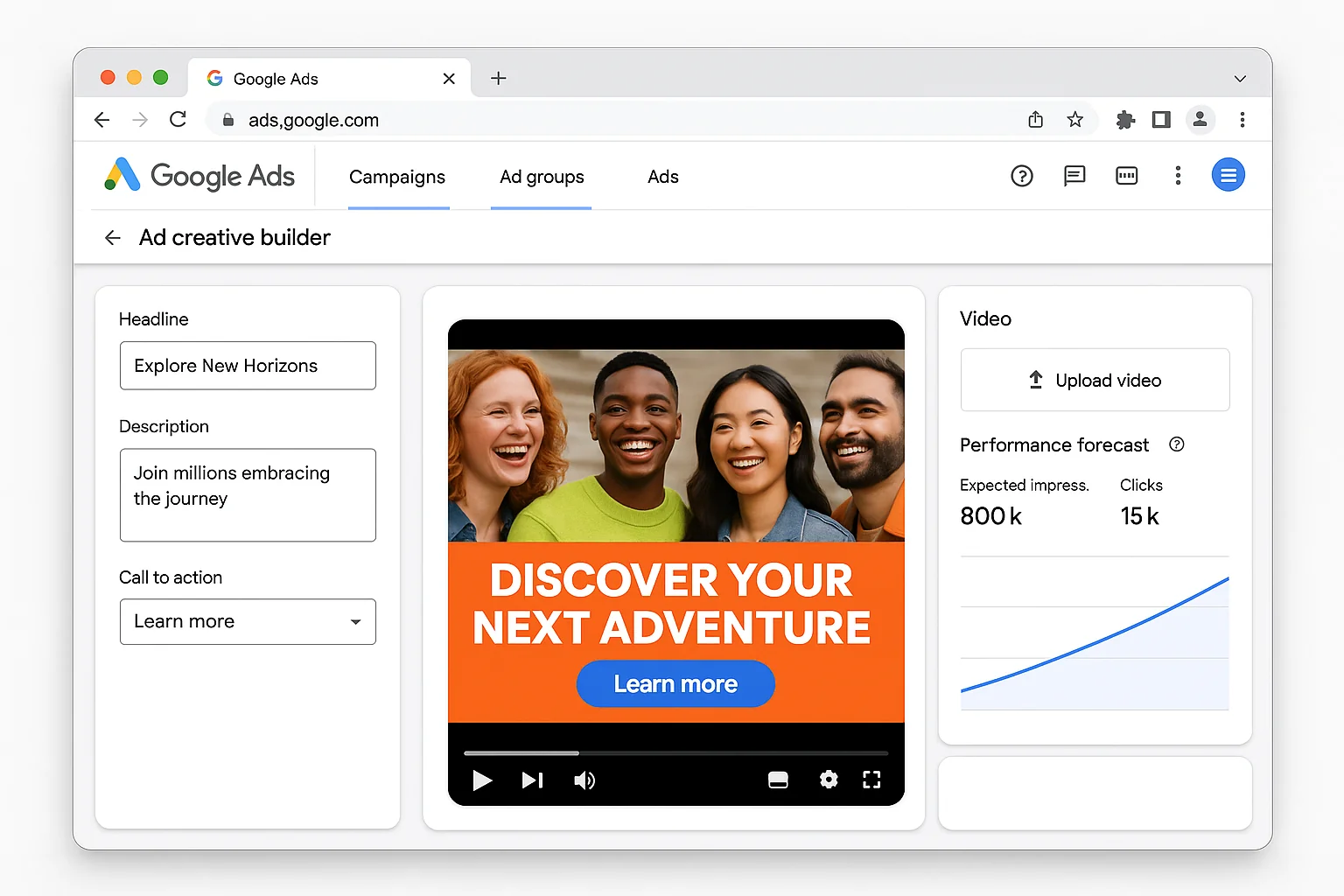
Step 4 - Create Awareness-Focused Ad Creative
Demand Gen supports multiple ad formats: single image ads, carousel ads, video ads, and product feeds. For awareness, focus on video ads and single image ads first.
Your creative should follow awareness principles, not conversion principles.
For awareness creative: - Lead with your brand name and logo in the first 3 seconds of video - Focus on what you do and who you help, not on a specific offer or CTA - Use bold visuals that stop the scroll - Keep video ads between 15 and 30 seconds - Write headlines that introduce your brand, not push a sale
For conversion creative (do NOT do this for awareness): - Leads with an offer or discount - Pushes urgency (“Limited time only!”) - Focuses on a specific product or service
The difference matters. Awareness creative builds familiarity. Conversion creative pushes action. You want the first one.
Step 5 - Set Your Budget and Launch
For awareness Demand Gen campaigns, Google’s best practices guide recommends giving the algorithm enough budget to optimize.
Start with a daily budget you are comfortable running for at least 14 days. The algorithm needs about 2 weeks to learn which placements and audiences deliver the cheapest clicks.
A good starting point for most small to mid-sized businesses is $30 to $50 per day. That gives you enough data for Google to optimize without burning through budget too fast.
Once you launch, do NOT make changes for the first 7 days. Let the learning phase complete. You will see performance fluctuate wildly in the first few days. That is normal.
The takeaway: The entire setup takes 5 steps and less than 30 minutes. The only setting that really matters for the awareness play is Step 2, choosing Maximize Clicks instead of a conversion-based bid strategy.
Why Demand Gen Placements Are PERFECT for Brand Awareness
This is the part most advertisers miss completely.
Demand Gen campaigns serve ads across three Google properties: YouTube, Gmail, and Discover. Each one is a discovery environment.
According to Google’s Demand Gen overview, these placements reach over 3 billion users across Google’s entertainment-focused surfaces.
YouTube is where people go to watch, learn, and be entertained. They are leaned back. They are open to new content. Your ad appearing before or during a video puts your brand in front of someone who is already in a consumption mindset.
Gmail puts your ad in the Promotions tab, right alongside brand emails the user already receives. The context is commercial by default. People expect to see brand messaging there.
Discover is Google’s personalized content feed on mobile. It surfaces content based on the user’s interests and browsing behavior. Your ad appears alongside news articles, blog posts, and other content the user cares about.
Here is why this matters for awareness. All three placements catch people BEFORE they search.
Traditional Search campaigns catch people who already know what they want and type a query. That is bottom-of-funnel. Demand Gen placements catch people who are open to discovering something new. That is top-of-funnel.
And because you are using Maximize Clicks, every dollar goes toward getting someone to actually visit your site. Not just view an impression. Not just watch 5 seconds of a video. An actual click-through to your website.
That is the difference between “I think I saw an ad for that company” and “I actually visited their website.” The second one sticks.
5 Ways To Optimize Your Awareness Demand Gen Campaign
Once your campaign is live and through the learning phase, here is how to make it work harder.
1. Test 3 to 5 Creative Variations Per Ad Group
Google’s Demand Gen algorithm performs its own creative optimization. Give it options. Upload at least 3 different images or videos, 3 headlines, and 3 descriptions.
The algorithm will test combinations and push budget toward the top performers. More creative options means faster learning and better results.
2. Use Placement Reports To Find Your Winners
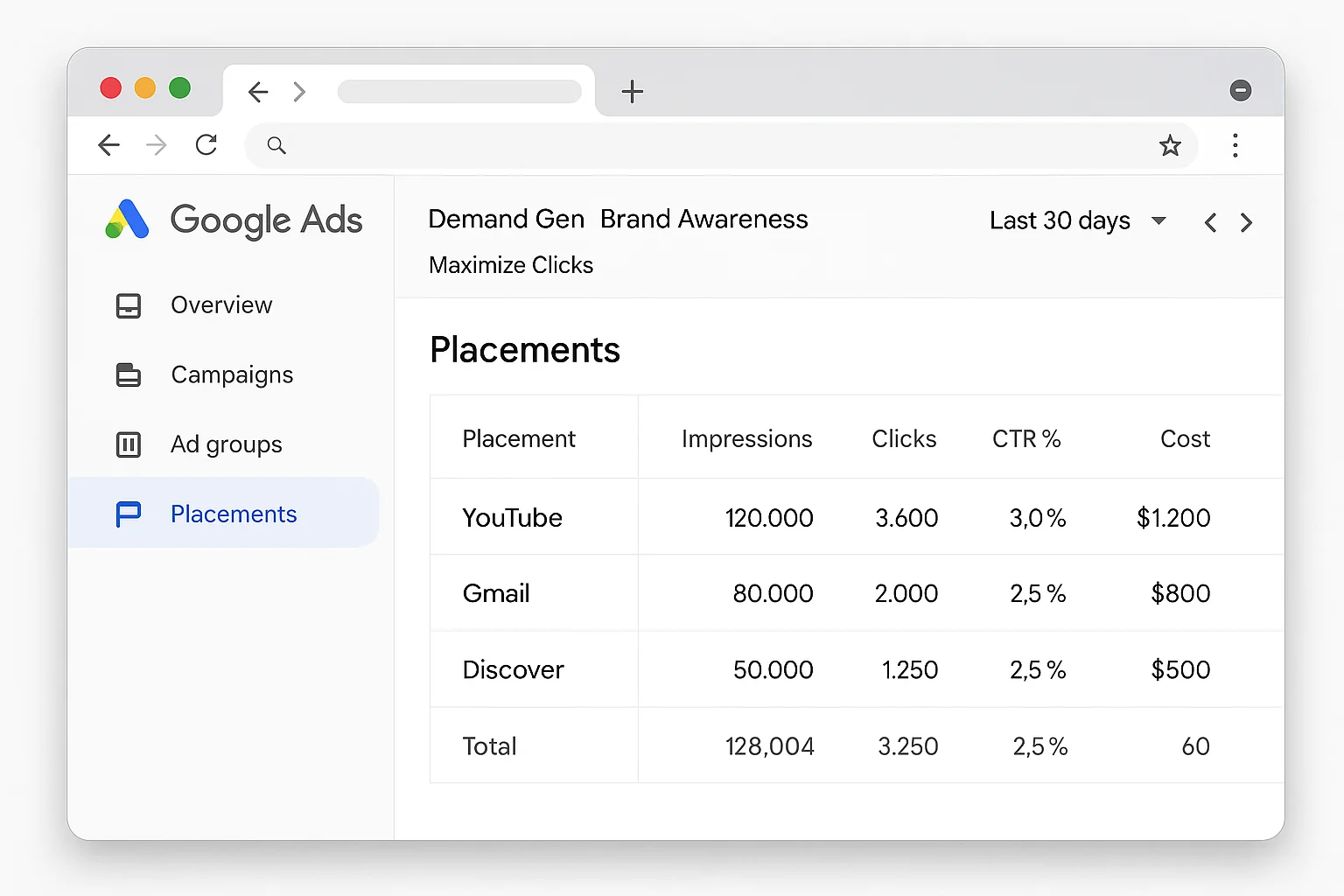
After 2 weeks, pull your placement report. You will see exactly how your ads performed on YouTube vs Gmail vs Discover.
For most awareness campaigns, YouTube and Discover will drive the highest volume of clicks. Gmail tends to have higher CTRs but lower volume.
Double down on what is working. If YouTube is delivering clicks at half the cost of Gmail, consider creating YouTube-specific ad groups with dedicated video creative.
3. Layer In Lookalike Segments After 30 Days
Once you have accumulated enough click data, upload your website visitors as a seed audience and create a lookalike segment.
This tells Google: “Find more people like the ones who already clicked.” It is a compounding loop. Your awareness campaign feeds data into better targeting, which feeds more efficient awareness spending.
4. Watch Your Frequency
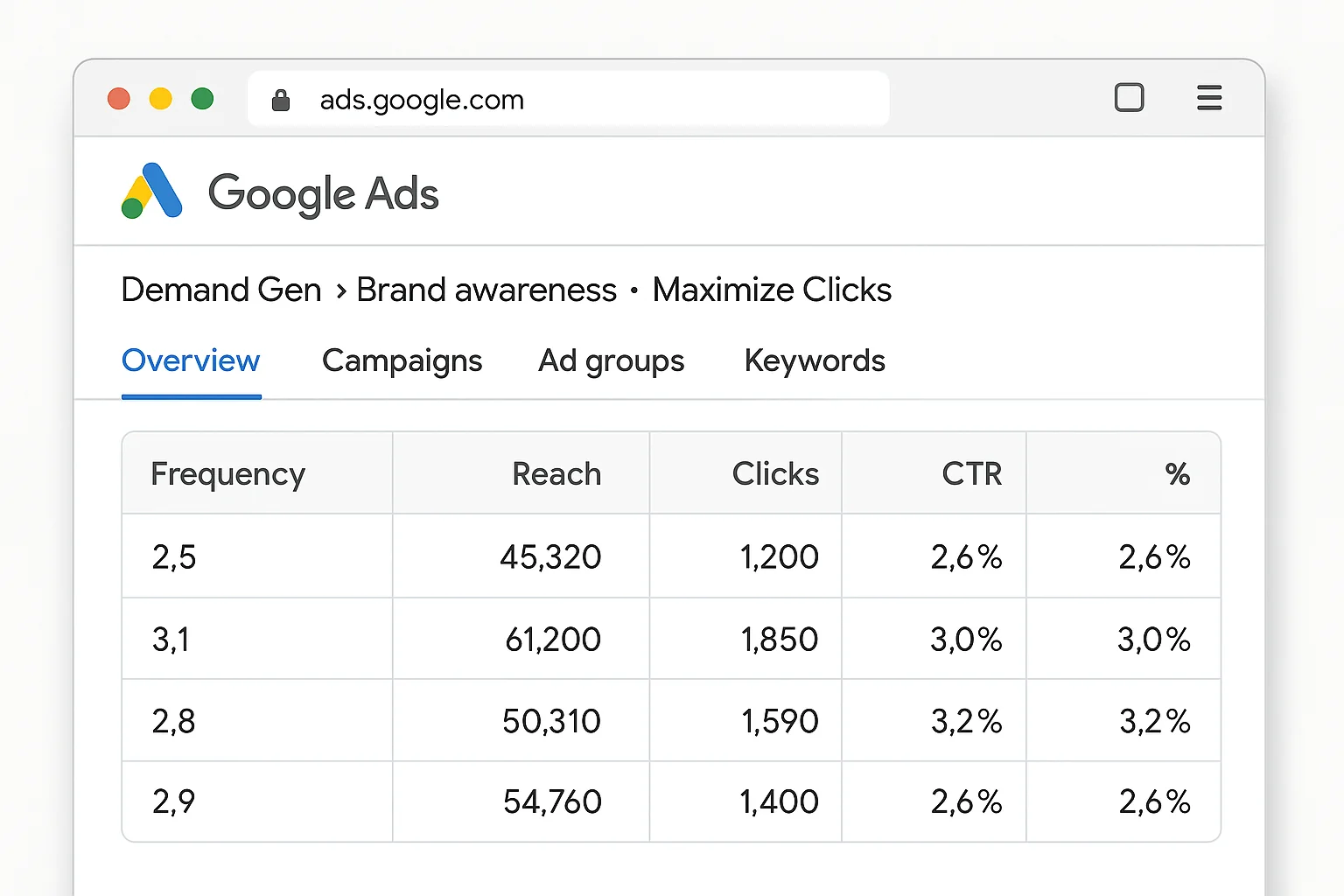
Brand awareness is about reaching new people, not hammering the same people 47 times.
Check your frequency metrics regularly. If your average frequency climbs above 3 to 4 per week, your audience is too narrow. Expand your targeting or increase your budget to reach more unique users.
5. Connect It To Your Full-Funnel Strategy
Demand Gen for awareness is step one. Here is how it fits into the bigger picture.
Top of funnel: Demand Gen with Maximize Clicks (awareness). Get people to your site for the first time.
Middle of funnel: Retarget those website visitors with Demand Gen using Maximize Conversions. Now that they know you, push them toward an action.
Bottom of funnel: Search campaigns capture people who now search for your brand name or your product category.
This three-layer approach turns Demand Gen from a standalone awareness play into the top of a full acquisition machine.
The takeaway: The real power of awareness Demand Gen shows up when you connect it to retargeting and Search. Your awareness spend does not just build familiarity. It fills the top of your funnel with qualified visitors you can convert later.
The Metrics That Actually Matter for Awareness Demand Gen
If you measure your awareness Demand Gen campaign by conversions, you will think it is failing.
It is not failing. You are measuring it wrong.
Here are the metrics that matter for an awareness objective:
- Clicks: Total site visits driven by the campaign. This is your primary KPI.
- CPC (cost per click): How efficiently you are driving those visits. Lower is better. Most awareness Demand Gen campaigns land between $0.30 and $1.50 CPC depending on industry and audience size.
- CTR (click-through rate): How compelling your creative is. Benchmark for Demand Gen is around 0.50% to 1.50%. Above 1% is strong.
- Unique reach: How many individual people saw your ads. Available in the “Reach metrics” columns.
- Frequency: How many times each person saw your ad. Keep this below 4 per week for awareness.
Ignore these for awareness campaigns: - Conversions (you are not optimizing for them) - ROAS (irrelevant for awareness) - Cost per conversion (will look terrible, and that is fine)
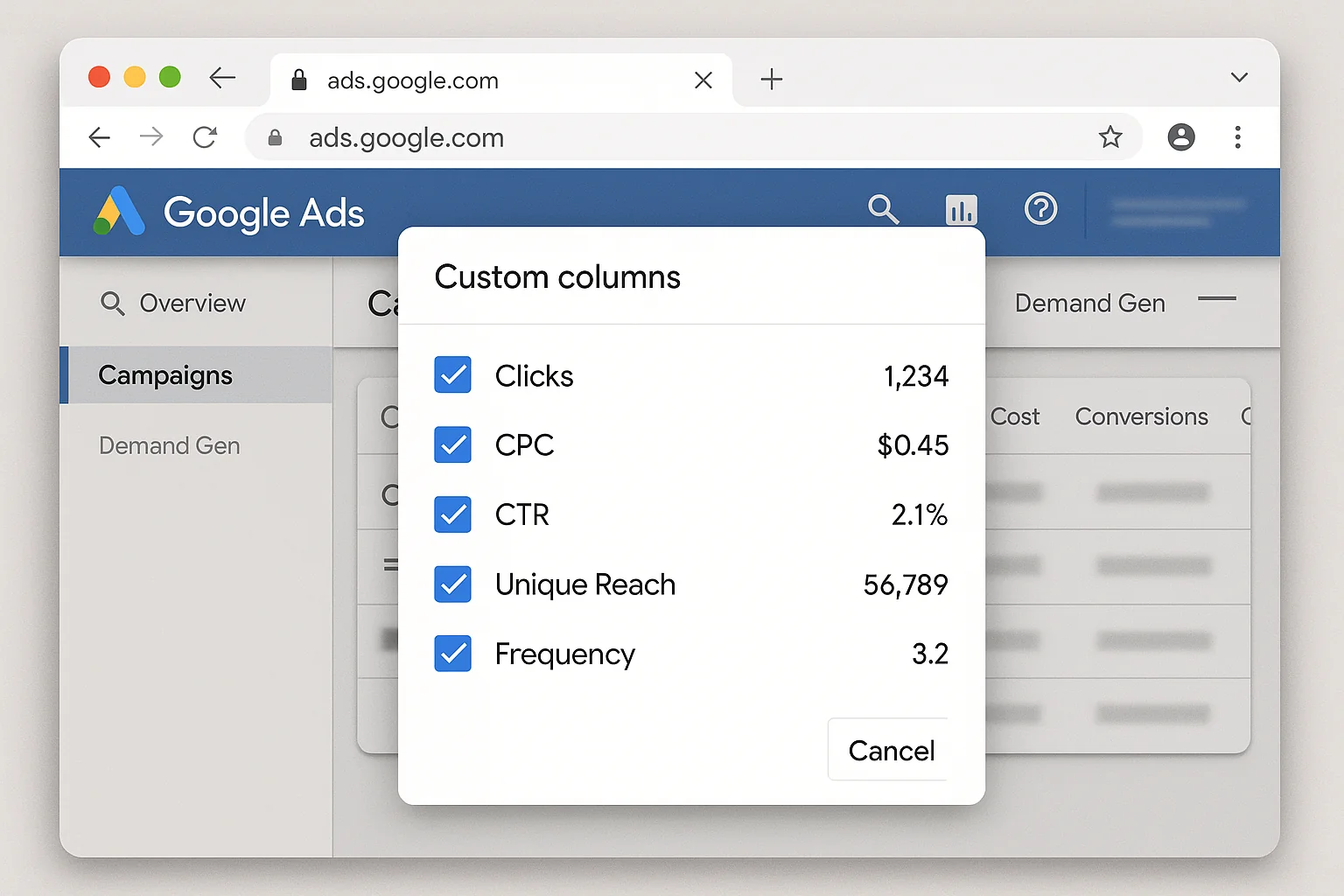
If your CPC is low, your CTR is healthy, and your unique reach is growing week over week, your awareness campaign is doing exactly what it should.
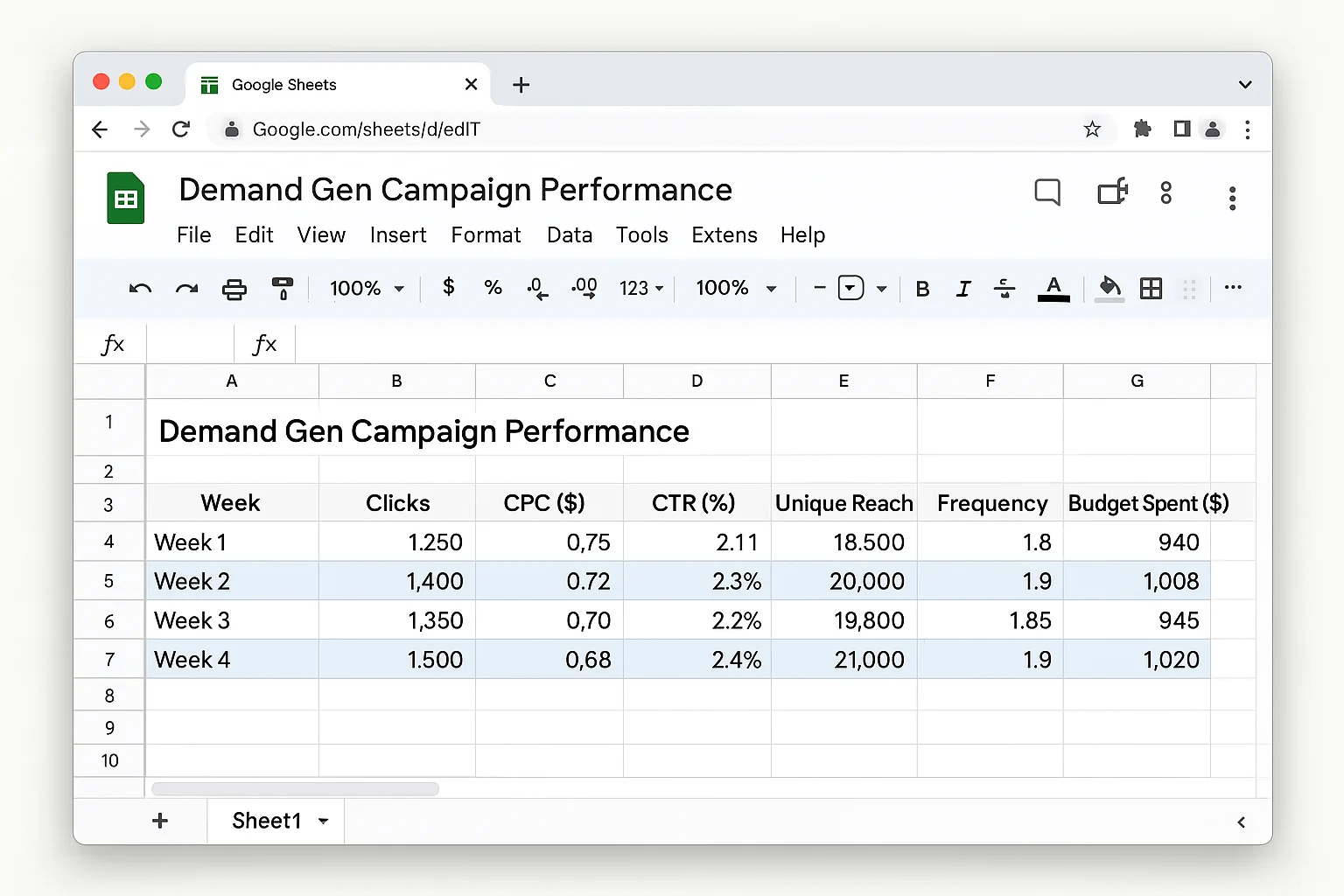
Track these weekly. Build a simple spreadsheet with weekly snapshots. After 30 days, you will have a clear picture of your cost per new website visitor and how efficiently Demand Gen is introducing your brand to new audiences.
Go Build Your Awareness Engine
Demand Gen campaigns for brand awareness are sitting right there in your Google Ads account. Same campaign type everyone else is using for conversions. One different bid strategy selection.
Maximize Clicks. That is the entire play.
Set it up this week. Give it 14 days. Watch the clicks roll in.
Then build your retargeting layer on top of it and turn awareness into revenue.
Do it up.