How To Use One Google Search Console Regex Filter To Instantly Separate Your Money Keywords From Your Traffic Keywords

TL;DR
There’s a regex filter hiding inside Google Search Console that instantly separates every query your site ranks for by search intent, informational vs. commercial, in under 30 seconds. Copy one regex, paste it into GSC’s query filter, and you’ll see EXACTLY which queries are bringing browsers vs. buyers. Then swap in a second regex to see your money keywords. No paid tools. No CSV exports. Just two regex patterns that change how you think about your entire content strategy.
In This Post You’ll Learn
- Why treating all your search queries the same is costing you money
- The exact regex patterns that separate informational from commercial queries in 30 seconds
- 5 more regex patterns that unlock hidden data in GSC
- What to actually DO once you’ve segmented your keywords by intent
- Why this free hack replaces paid keyword intent tools
Your Search Console Is Hiding Your Most Valuable Keywords
Here’s something most site owners never realize: not all search queries are created equal.
Some queries bring you traffic. Some queries bring you money.
And right now, Google Search Console is showing you both. Mixed together in one giant, unsorted list.
That’s like dumping your cash register and your junk drawer into the same box and calling it “revenue.” You’d never do that with your finances. So why are you doing it with your keyword data?
The difference matters more than you think.
Informational queries like “what is email marketing,” “how does retargeting work,” and “SEO vs SEM” bring visitors who are learning. They’re browsing. They’re researching. They’re valuable, but they’re not pulling out their credit card.
Commercial queries like “buy email marketing software,” “best retargeting tool for Shopify,” and “SEO agency pricing” bring visitors who are ready to act. They’re comparing. They’re evaluating. They’re this close to converting.
According to Google’s own documentation on Search Console, the Performance report shows you every query your site appears for. But it doesn’t tell you which ones are informational and which ones are commercial.
It just dumps them all in one list.
Here’s what that looks like in practice. Let’s say you run an online store selling running shoes. Your GSC data shows 5,000 impressions this month. Looks great on paper.
But when you segment by intent, you discover that 4,200 of those impressions come from informational queries like “how to choose running shoes” and “what causes shin splints.” Only 800 impressions are from commercial queries like “best running shoes for flat feet” and “buy Brooks Ghost 16 online.”
That 800 is where your revenue lives. The 4,200 is building your authority, but it’s not paying the bills today.
Without segmentation, those two numbers are invisible. You’re flying blind.
Until now.
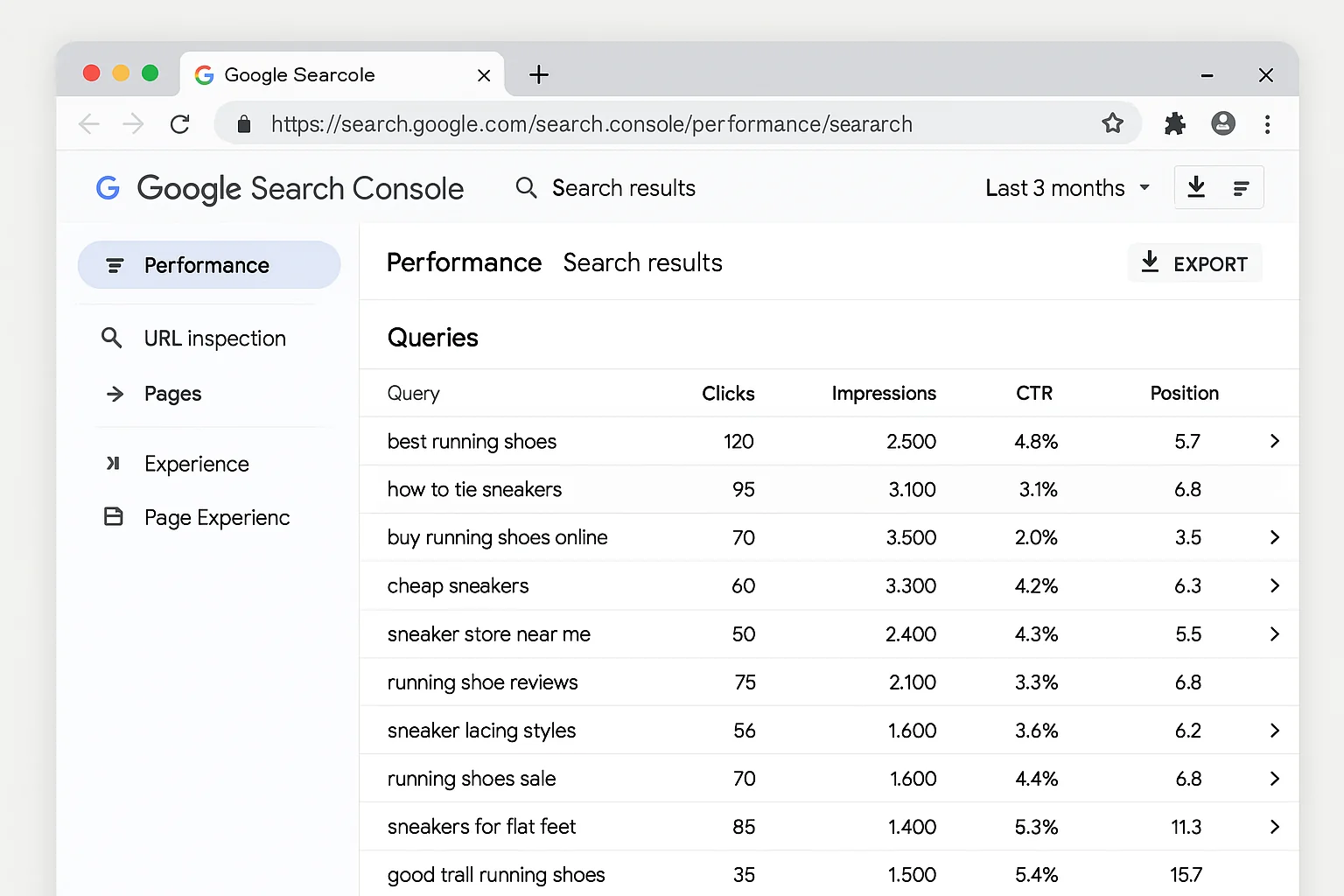
The 30-Second Regex Hack That Segments Every Query By Intent
This is the core tactic. Two regex patterns. 30 seconds each. Copy, paste, done.
The Informational Regex
This filter shows you EVERY informational query your site ranks for. Questions, research terms, educational searches.
Step 1: Open Google Search Console and click Performance, then Search Results.
Step 2: Click + New in the filter bar, then select Query.
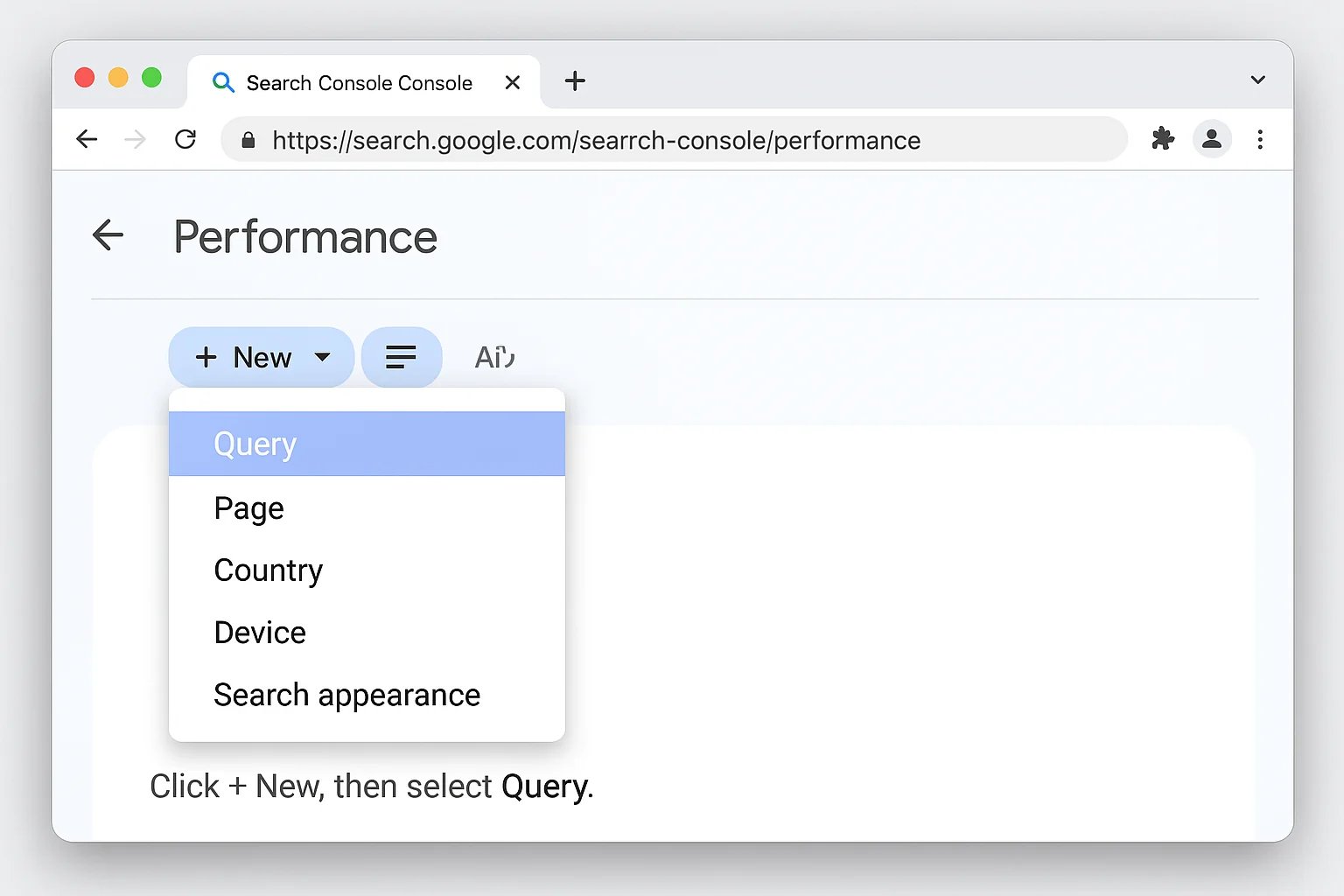
Step 3: In the filter dialog, click Custom (regex).
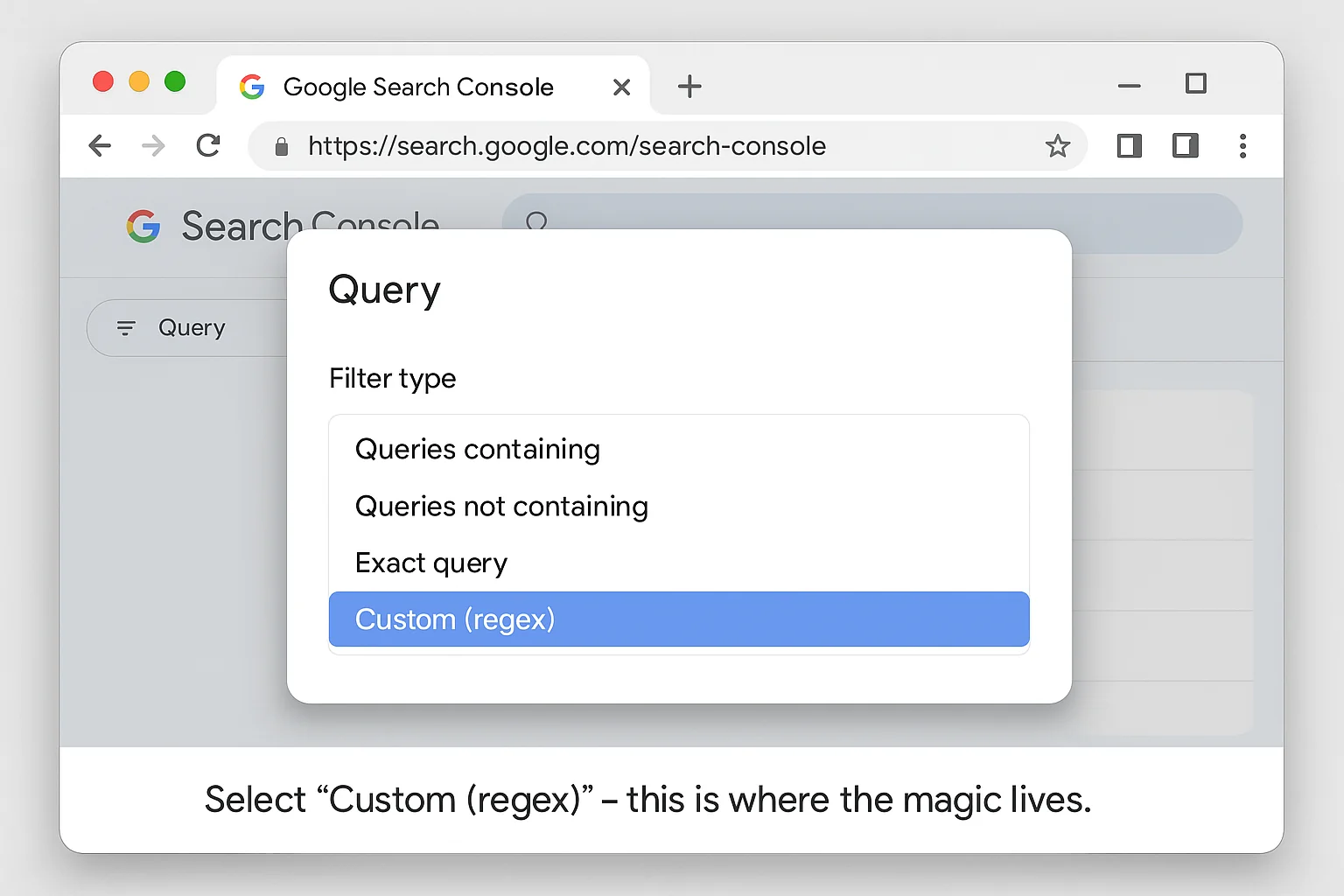
Step 4: Paste this regex:
^(who|what|where|when|why|how|was|did|do|is|are|aren't|won't|does|if)[ ]
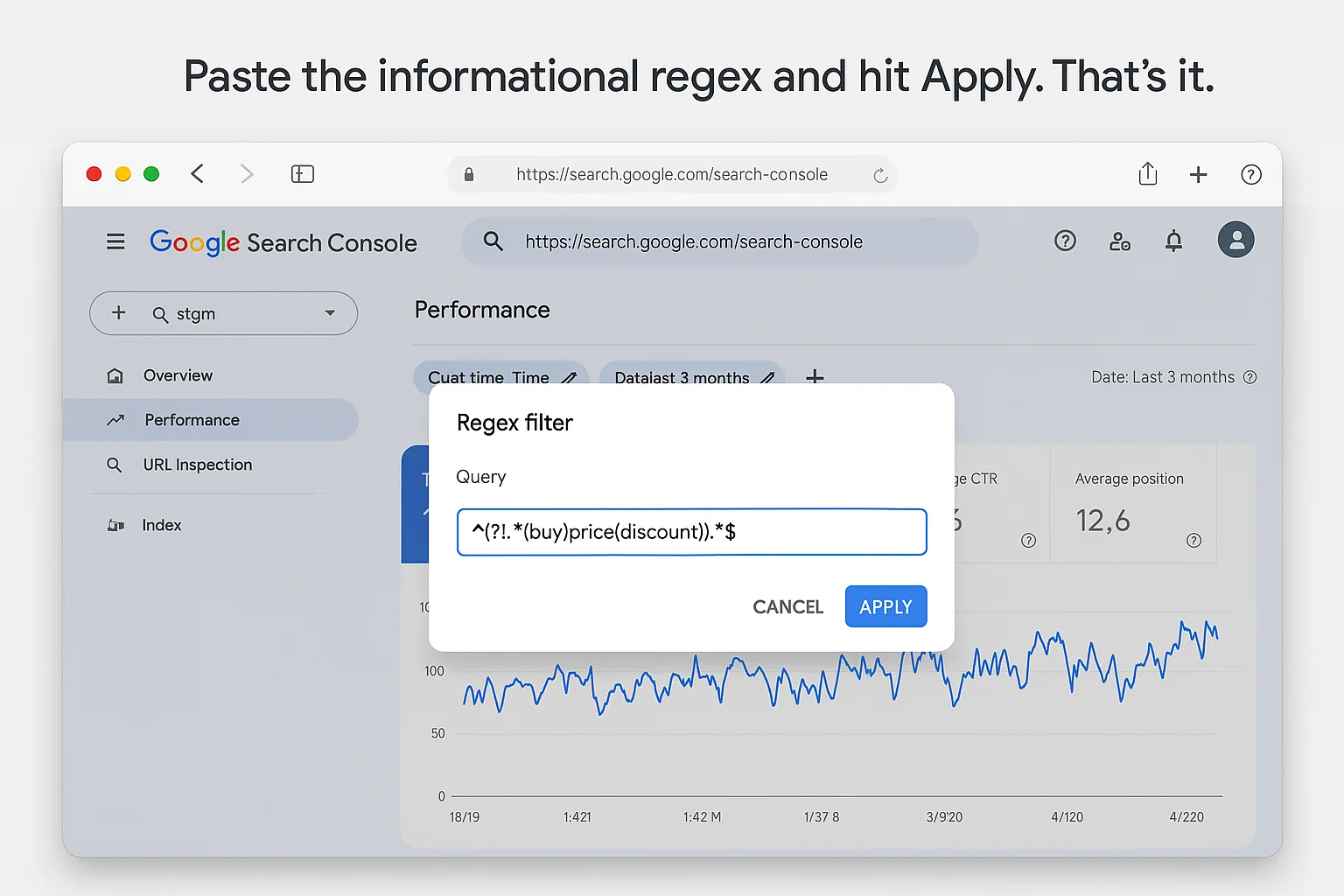
Step 5: Hit Apply.
Now look at your query list.
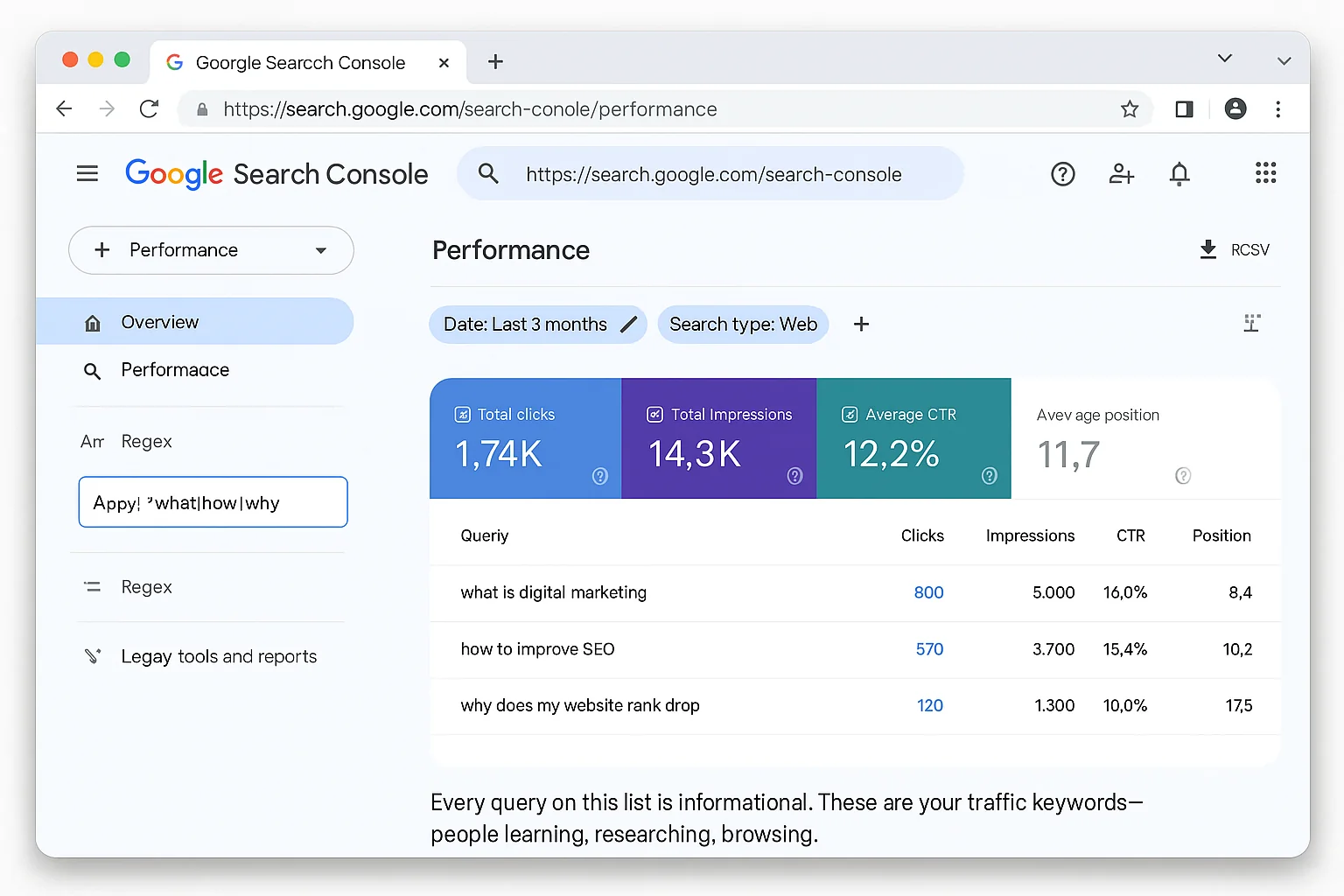
Every single query on your screen is informational. These are the “who, what, where, when, why, how” searches. People in research mode.
Look at the impressions. Look at the clicks. Look at the CTR.
This is your informational traffic profile. Probably a BIG chunk of your total queries.
Pay attention to the CTR column here. Informational queries typically have lower click-through rates because Google often answers them directly in the SERP with featured snippets, AI Overviews, or knowledge panels. High impressions paired with low clicks means Google is answering the question for the user before they ever reach your site.
That’s useful to know. But it’s not where your revenue comes from.
Now here’s where it gets interesting.
The Commercial Regex
Remove that filter and paste this one instead:
^(buy|order|purchase|get|best price|cheap|discount|deal|coupon|pricing|cost|review|top|best|compare|vs|versus|alternative)[ ]
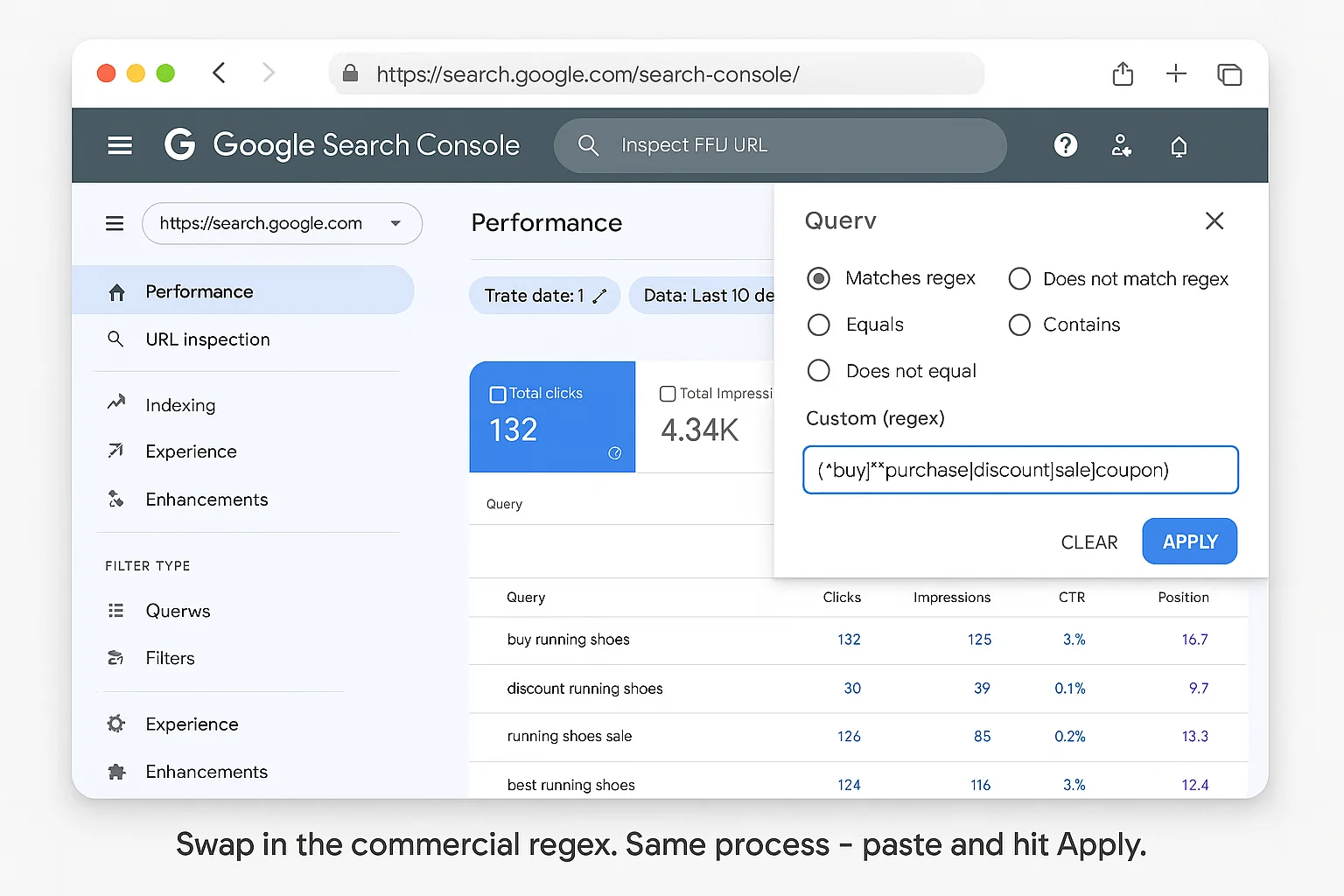
Hit Apply again.
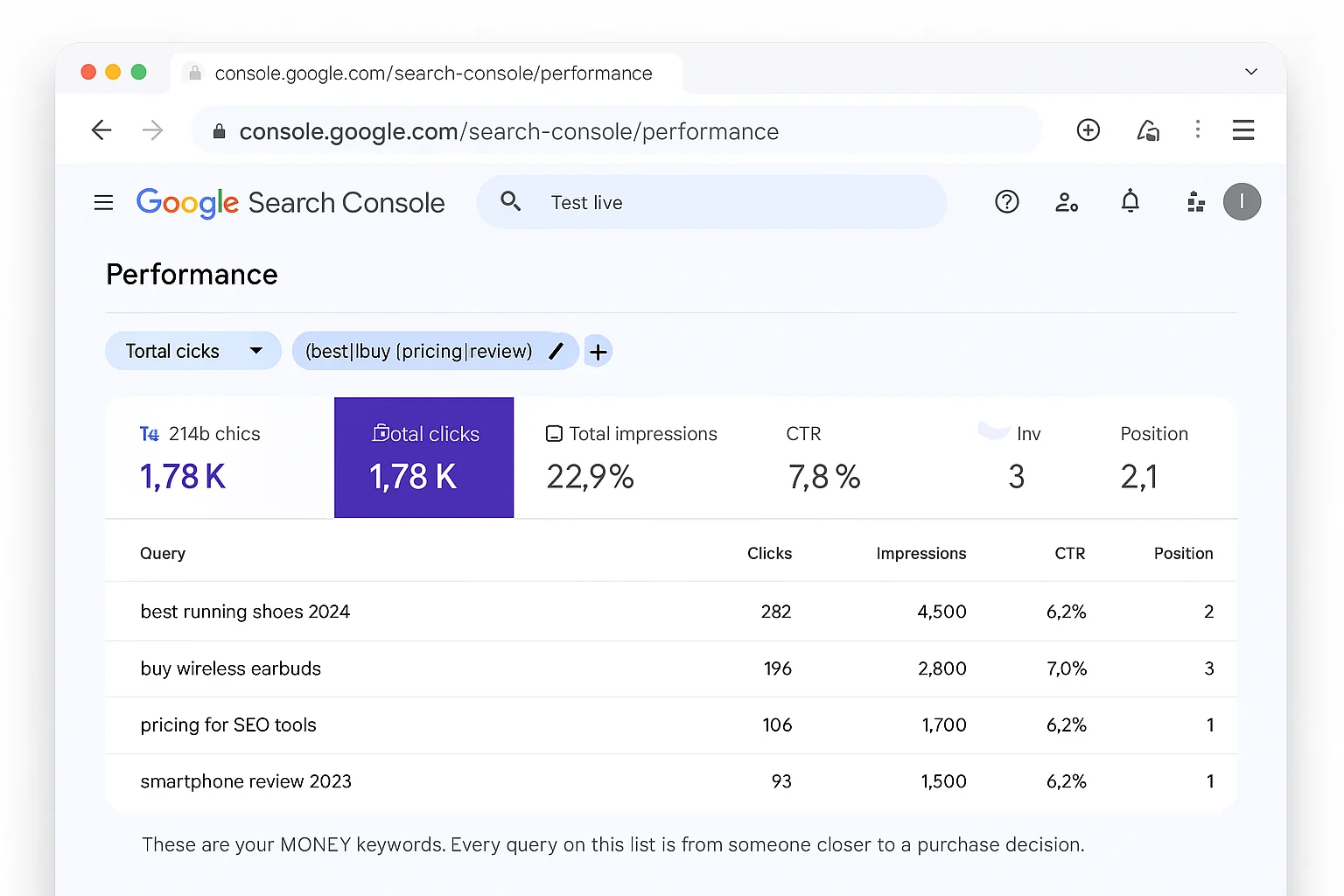
Now you’re looking at a completely different list.
Completely.
These are your money keywords. The queries where someone is comparing, evaluating, pricing, or actively looking to buy.
Compare the two lists side by side and you’ll see something that hits you like a truck:
Most sites have 10x more informational queries than commercial ones.
That ratio matters. A LOT.
If 95% of your queries are informational and 5% are commercial, you have a massive content gap on the money side. You’re building an audience, but you’re not building a business.
If you have a healthy mix (say 70% informational, 30% commercial), your content funnel is working. Informational content brings people in, commercial content converts them.
The point isn’t that informational queries are bad. They’re essential for authority and trust. But if you don’t know the split, you can’t fix it. And you definitely can’t improve it.
The takeaway: Two regex patterns, 30 seconds each, and you now have a complete picture of your traffic by intent. No paid tools needed. Just Google’s own data, sliced the way Google never bothered to slice it for you.
5 More Regex Patterns That Unlock Hidden GSC Data
The informational/commercial split is just the start. Here are 5 more regex patterns you can paste into the same filter to unlock different slices of your search data:
1. Comparison Queries
(vs|versus|compare|comparison|better|difference between)
These are high-value evaluation queries. People typing “Mailchimp vs ConvertKit” or “difference between SEO and SEM” are actively choosing between options. If your content answers the comparison, you win the click. Comparison queries convert at some of the highest rates in search because the user has already decided to buy something. They just need help picking which one.
2. Local Intent Queries
(near me|in my area|nearby|local|[your city name])
Replace [your city name] with your actual city. This reveals whether people are finding you through local search. Critical for service businesses and brick-and-mortar stores. If you’re a plumber in Austin and you see zero “near me” queries, your local SEO needs work. If you see dozens, you know exactly which services people search for locally.
3. Long-Tail / Conversational Queries
.{40,}
This regex filters for queries with 40+ characters. Almost always long-tail or conversational. These are often AI-generated prompts from Google’s AI Overview and AI Mode. They’re goldmines for content optimization.
4. Non-Branded Queries
Use the “Queries not containing” filter (not regex) and type your brand name. This strips out every branded search and shows you only pure organic discovery. The queries where strangers find you through Google, not because they already know your name.
5. “Best” + Category Queries
^best[ ]
This one’s simple but powerful. “Best” queries signal someone who’s ready to make a decision but wants validation. “Best CRM for startups,” “best running shoes for flat feet,” “best email marketing tool.”
These convert at absurdly high rates because the person has already decided to buy. They just need to pick which one.
If you’re not showing up for “best” queries in your niche, you’re handing ready-to-buy customers to your competitors. Run this regex, see what “best” queries you’re already ranking for, and create dedicated content for the ones you’re missing.
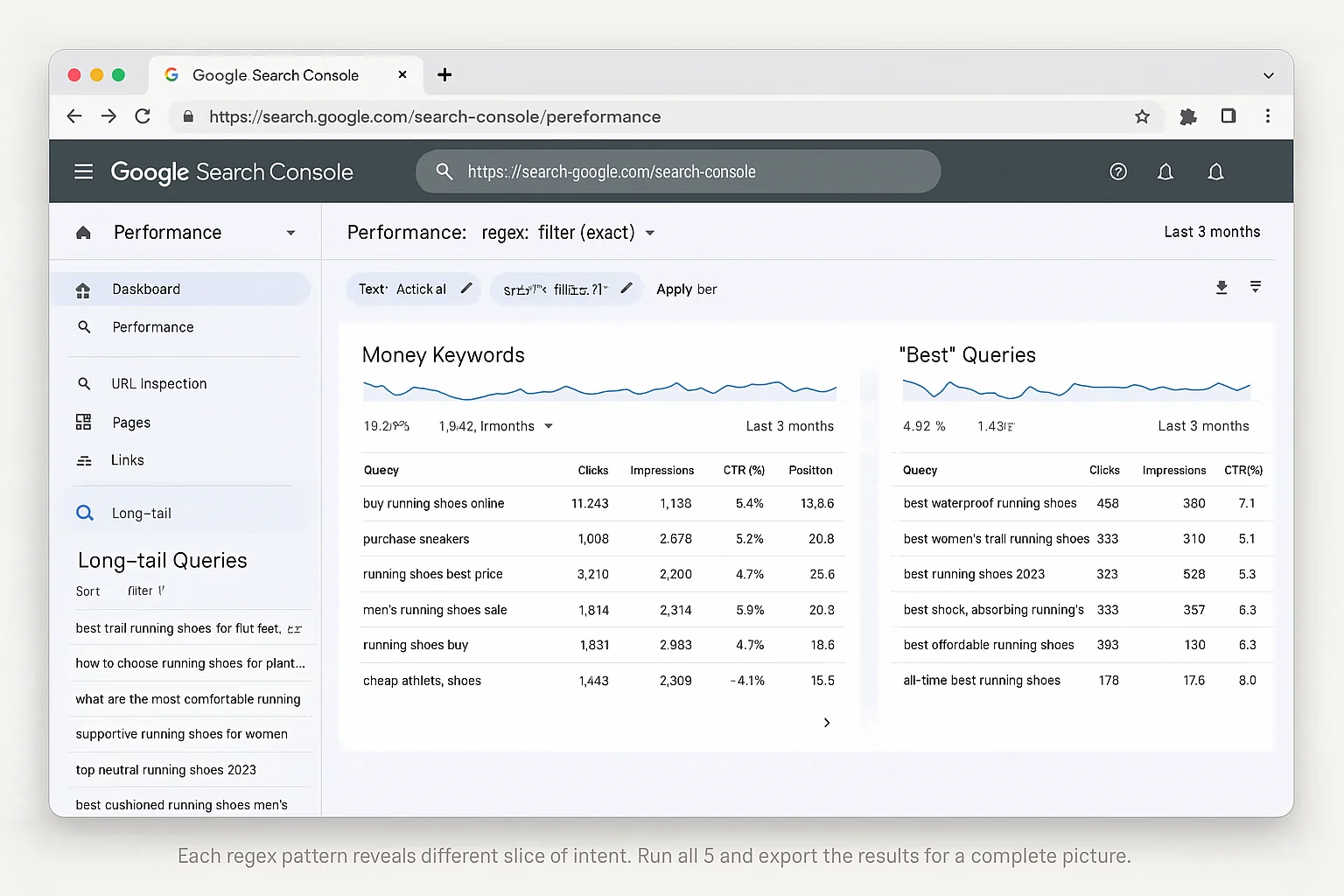
The takeaway: These 5 regex patterns give you an instant keyword intent audit, for free. Most paid SEO tools charge $100+/month for intent classification that’s less accurate than what you can pull directly from Google’s own data.
What To Do Once You’ve Segmented Your Keywords
Finding the split is step one. The money move is what you do with it.
If 80%+ Of Your Queries Are Informational
Your content is attracting researchers, not buyers.
That’s not bad. It means you have authority. But you’re leaving revenue on the table.
Here’s the fix:
- Look at your top informational queries and ask: “What would someone search NEXT?” If they searched “what is retargeting,” they’ll eventually search “best retargeting tools.” Create that page. The informational query tells you exactly what commercial page to build next.
- Add commercial CTAs to your informational content. Your “how to” posts should naturally lead to a product, tool, or service recommendation. If your top informational page is “how to set up email marketing,” that page should link to your “best email marketing tools” comparison.
- Build comparison and review pages targeting the commercial regex terms you’re NOT showing up for yet. These pages don’t need to be long. They need to be specific, direct, and structured for easy skimming.
If You Have Almost No Commercial Queries
You have a content gap. Most of your competitors are ranking for the money keywords while you’re stuck answering questions.
The fix is targeted:
- Run the commercial regex and export whatever you DO have, even if it’s 10 queries. Those are your seeds. Ten commercial queries is enough to build an entire bottom-of-funnel content strategy.
- Build dedicated pages for each commercial keyword cluster: pricing pages, comparison pages, “best X for Y” pages, product reviews. One page per cluster. Don’t try to stuff them all into a single post.
- Interlink from your informational content to your new commercial pages. The informational posts feed authority to the commercial pages. This is how you build a content funnel. Top-of-funnel informational content drives traffic, internal links push visitors toward bottom-of-funnel commercial pages that convert.
The 80/20 Rule Of Intent Segmentation
Here’s the pattern that shows up over and over when you run these regex filters:
80% of your queries drive 20% of your conversions (informational content, high volume, low conversion).
20% of your queries drive 80% of your conversions (commercial content, lower volume, high conversion).
The regex filter tells you exactly which 20% to double down on. That’s not theory. That’s your Search Console performance data telling you where your money is.
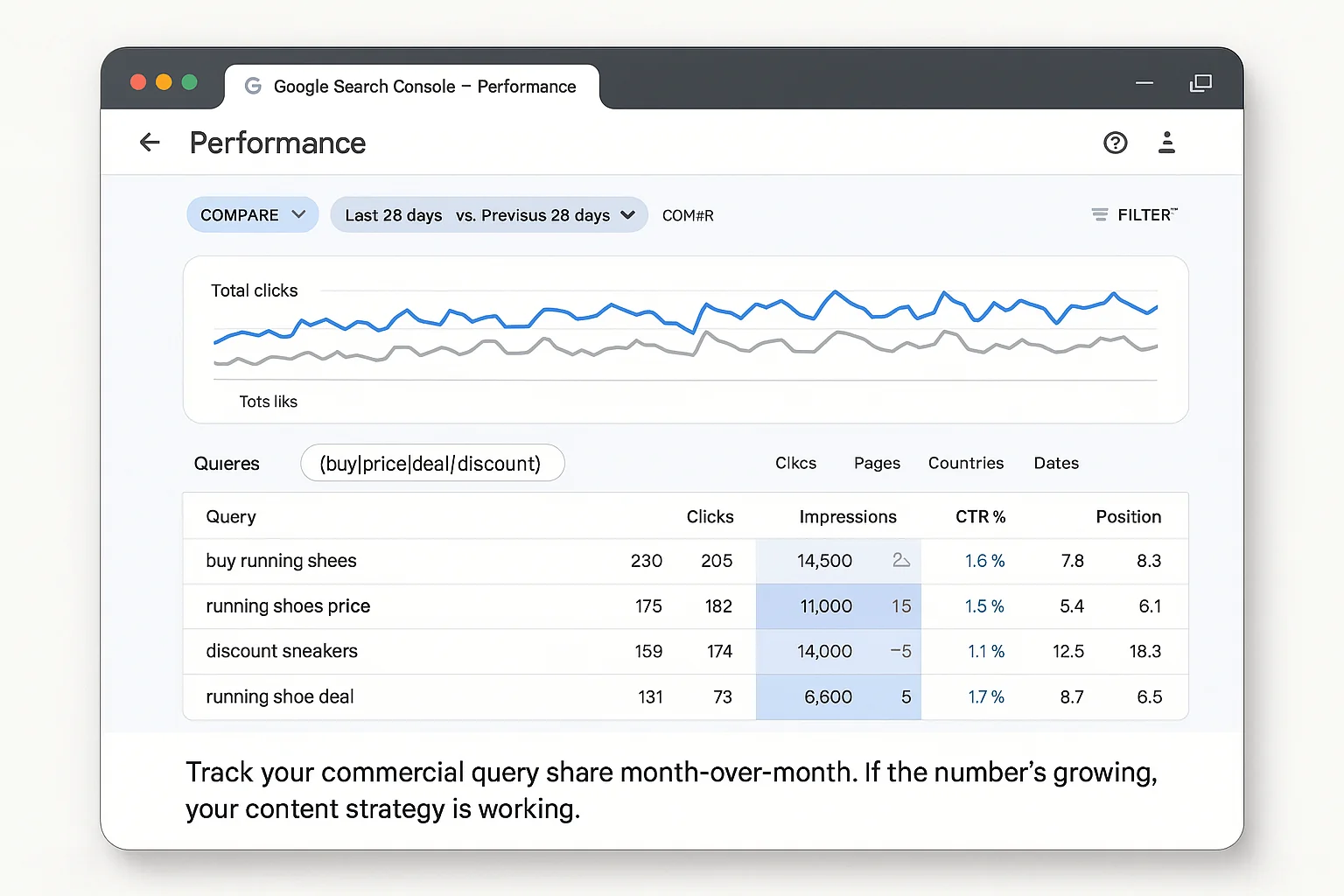
Most SEOs obsess over total traffic. Smart SEOs obsess over commercial query share.
Now you know yours. And knowing the number is the first step to improving it.
Why This Beats Every Paid Keyword Intent Tool
There are SEO platforms charging $99, $199, even $399 a month that include “search intent classification” as a feature.
Here’s what they actually do: they scrape SERP results and use algorithms to guess whether a keyword is informational, commercial, or transactional.
They’re estimating.
Google Search Console isn’t estimating. It’s showing you what actually happened: the real queries, with real impressions and real clicks, classified by YOUR regex in YOUR account.
For free. In 30 seconds.
Paid intent tools just became irrelevant.
And here’s the kicker: the paid tools classify keywords based on general SERP patterns. They look at what types of results Google shows for a keyword and infer the intent. GSC tells you the intent based on your actual data: real users, real impressions, real clicks on YOUR pages. One is a model. The other is reality. Guess which one you should trust.
Here’s how to turn this into a system:
- Run both regex filters on the 1st of every month
- Export the informational and commercial query lists
- Track the ratio month-over-month. Is your commercial share growing?
- Use the 5 bonus regex patterns quarterly to audit comparison, local, long-tail, non-branded, and “best” queries
- Feed every insight back into your content calendar
The sites that win at SEO aren’t the ones with the most content.
They’re the ones that know which content makes money, and build more of it.
Two regex patterns just told you that. Everything else is noise.
Go Segment Your Keywords Right Now
Open Google Search Console. Click Performance. Click Search Results.
Paste the informational regex. See what shows up.
Then swap in the commercial regex. Compare the two lists.
That gap between them is your biggest content opportunity sitting right there, in data you already own, inside a tool you already have access to.
Here’s the cheat sheet to bookmark:
- Informational regex:
^(who|what|where|when|why|how|was|did|do|is|are|aren't|won't|does|if)[ ] - Commercial regex:
^(buy|order|purchase|get|best price|cheap|discount|deal|coupon|pricing|cost|review|top|best|compare|vs|versus|alternative)[ ]
Copy them. Paste them. Run them today.
Then close the gap, and watch what happens to your conversions.
Follow The Growth Hacker for more tested growth tactics. The kind that actually move the needle.