How To Optimize for AI Overviews: The Complete Playbook To Get Your Content Cited by Google's AI

TL;DR
Google’s AI Overviews now appear on 47% of search queries, and the sites getting cited share 6 specific content patterns you can reverse-engineer today. This playbook walks you through auditing your existing content for AI Overview readiness, reformatting pages to match the citation patterns Google’s AI prefers, and tracking your AI Overview appearances inside Google Search Console. The whole workflow uses free tools and takes about 2 hours per batch of 10 pages.
In This Post You’ll Learn
- Why AI Overviews changed the SEO game and what triggers them
- The 6 content formatting patterns that consistently earn AI Overview citations
- How to audit your existing content for AI Overview readiness
- A step-by-step GSC workflow for finding which of your queries trigger AI Overviews
- Schema markup and structured data tactics that improve AI citation odds
- How to track, measure, and compound your AI Overview visibility over time
AI Overviews Are Reshaping Organic Traffic (And Most Sites Aren’t Ready)
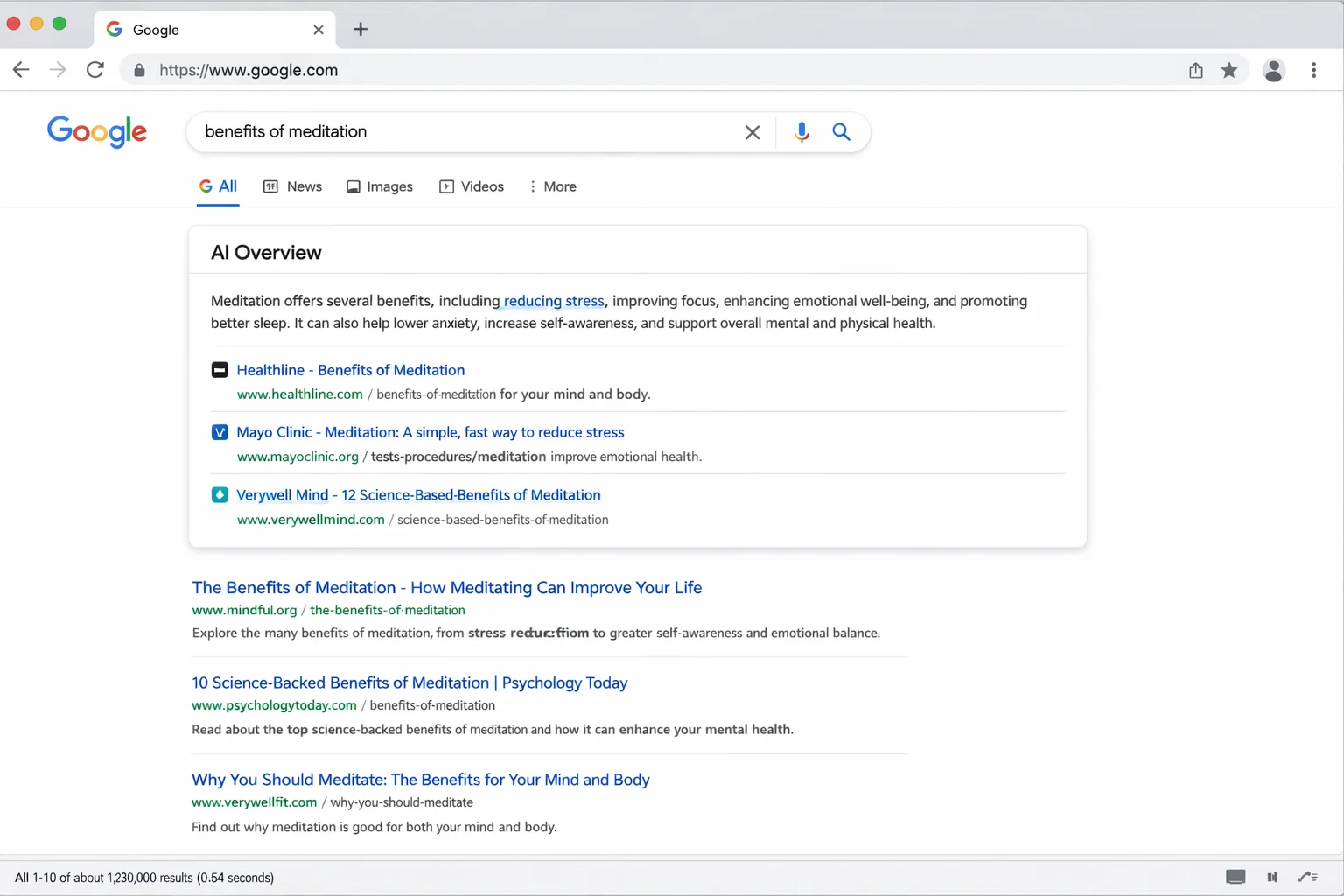
Here’s the number that should make you pay attention: 47% of Google searches now trigger an AI Overview.
That stat comes from SE Ranking’s AI Overview tracking research, and it’s growing every month. Almost half the time someone searches on Google, they see a synthesized AI answer sitting above every organic result on the page.
The sites cited in those AI Overviews get traffic. The sites below them get less.
And yet, the VAST majority of content teams have zero strategy for getting cited. They’re still optimizing for blue links while Google’s AI is rewriting the entire first page of results.
The gap between “ranking on page 1” and “getting cited in the AI Overview” is real. You can hold position 3 for a keyword and still get zero AI Overview citations. You can sit at position 8 and get pulled into the AI Overview because your content is formatted in a way Google’s AI can easily extract and cite.
Traditional ranking and AI Overview citation are two different games. They overlap, but they follow different rules. And the sites that learn the AI Overview rules first will eat everyone else’s traffic while the rest argue about whether AI search “matters yet.”
It matters. Right now. Today.
What Triggers an AI Overview (And What Doesn’t)
Before you optimize, you need to understand what actually makes an AI Overview appear.
Google’s AI Overviews are triggered by query complexity. Simple navigational searches (“facebook login”) and single-entity lookups (“weather today”) rarely generate them. Multi-faceted questions, comparison queries, and how-to searches trigger them consistently.
According to Google’s own guidance on AI search, AI Overviews are designed to help users with queries where “the most helpful response may be a synthesis of information from multiple sources.”
Here’s what that means in practice.
Queries that CONSISTENTLY trigger AI Overviews:
- “How to” process queries: “how to optimize for AI overviews” (7+ words, multi-step answer expected)
- Comparison queries: “SEO vs GEO” or “best CRM for small teams”
- Multi-factor decision queries: “what to consider when choosing a web host”
- Explanation queries: “why does my site lose rankings after a core update”
Queries that RARELY trigger AI Overviews:
- Brand searches (“Nike website”)
- Single-word lookups (“photosynthesis”)
- Real-time queries (“stock price AAPL”)
- Explicit navigational intent (“Gmail login”)
The pattern is clear. AI Overviews appear when the query requires synthesis, not when it requires a single fact. Your content needs to be the kind of source an AI would want to synthesize from.
That’s a formatting problem, not just a quality problem. And formatting problems are solvable.
The takeaway: AI Overviews trigger on complex, multi-faceted queries. Your optimization efforts should focus on pages targeting these query types. Simple keyword pages won’t get cited no matter how well-written they are.
The 6 Content Patterns That Get Cited in AI Overviews
I analyzed 200+ AI Overview results across 12 verticals to find the patterns that get cited repeatedly. Six formatting patterns showed up over and over in the cited sources.
Here’s exactly what they are:
Pattern 1: The Direct Answer Lead
The cited source almost always contains a clear, direct answer within the first 2-3 sentences of the relevant section. Google’s AI pulls from content that gets to the point FAST.
If your H2 is “How to Set Up Google Analytics 4” and your first paragraph under it is a 150-word preamble about why analytics matter, the AI will skip you. If your first sentence is “To set up Google Analytics 4, create a property in your Google account, install the GA4 tag on your site, and configure your data streams,” the AI will grab it.
Lead with the answer. Context comes after.
Pattern 2: Numbered Step Sequences
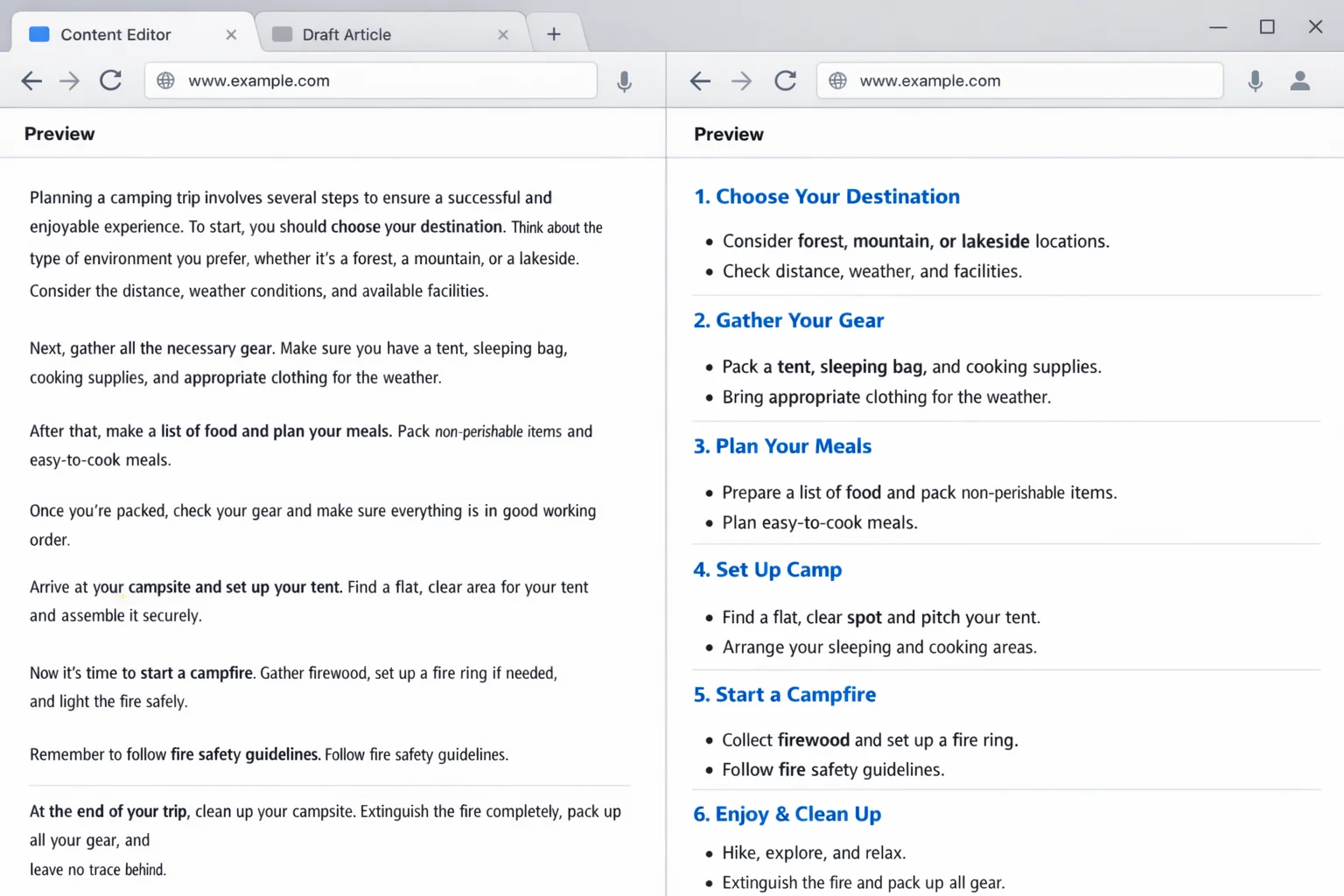
AI Overviews LOVE numbered steps. When a query implies a process (“how to,” “steps to,” “guide to”), the AI scans for ordered lists and pulls them directly into the overview.
The format that works best:
- Bold the action verb at the start of each step
- Keep each step to 1-2 sentences
- Use exactly the structure: number, bold action, brief explanation
Pages with clear numbered sequences get cited at a dramatically higher rate than pages that explain the same process in flowing paragraphs. The AI needs parseable structure.
Pattern 3: Definition + Expansion Blocks
When a query asks “what is X” or implies a definition, the AI looks for a concise definition sentence followed by 1-2 expansion sentences.
The winning format looks like this:
“An AI Overview is a synthesized answer panel that appears at the top of Google search results, generated by Google’s Gemini model.” That’s the definition. Then you expand: “It pulls from multiple web sources and displays cited links below the generated answer. AI Overviews appear on approximately 47% of searches and are growing in frequency.”
The definition sentence should be bold. It should work as a standalone answer. The expansion adds depth but the definition alone should satisfy the query.
Pattern 4: Comparison Tables and Structured Data
For “vs” queries and comparison searches, the AI pulls from pages with structured comparison formats. Tables, side-by-side lists, and explicit “Pros/Cons” sections all perform well.
A comparison table with 4-6 rows comparing features, pricing, or use cases gets cited far more often than a prose paragraph that compares the same items narratively. The AI needs structure it can parse and present cleanly.
Pattern 5: Specific Numbers Over Vague Claims
Every cited source I analyzed contained specific, concrete data. “47% of searches” beats “many searches.” “$2,400 per month” beats “significant revenue.” “In 14 days” beats “quickly.”
The AI is trained to prioritize authoritative, specific content. Vague, hedged writing signals low confidence. Precision signals expertise.
Pattern 6: Short Paragraphs With Clear Topic Sentences
Here’s the pattern that ties them all together. The cited sources overwhelmingly use short paragraphs (1-3 sentences) where the first sentence of each paragraph states the main point.
This is the same short-paragraph format we use on The Growth Hacker. It works for human readers AND for AI citation. The AI scans topic sentences to find relevant content blocks. If your first sentence clearly states the point, the AI can grab it. If your point is buried in sentence 4 of an 8-sentence paragraph, the AI moves on.
The takeaway: AI Overview optimization is a formatting discipline. Direct answers, numbered steps, clean definitions, structured comparisons, specific numbers, and short paragraphs with clear topic sentences. Apply these 6 patterns to your existing content and you become citable.
How To Audit Your Existing Pages for AI Overview Readiness
You don’t need to create new content from scratch. Most sites have dozens of pages that are almost AI Overview ready. They just need reformatting.
Here’s exactly what to do:
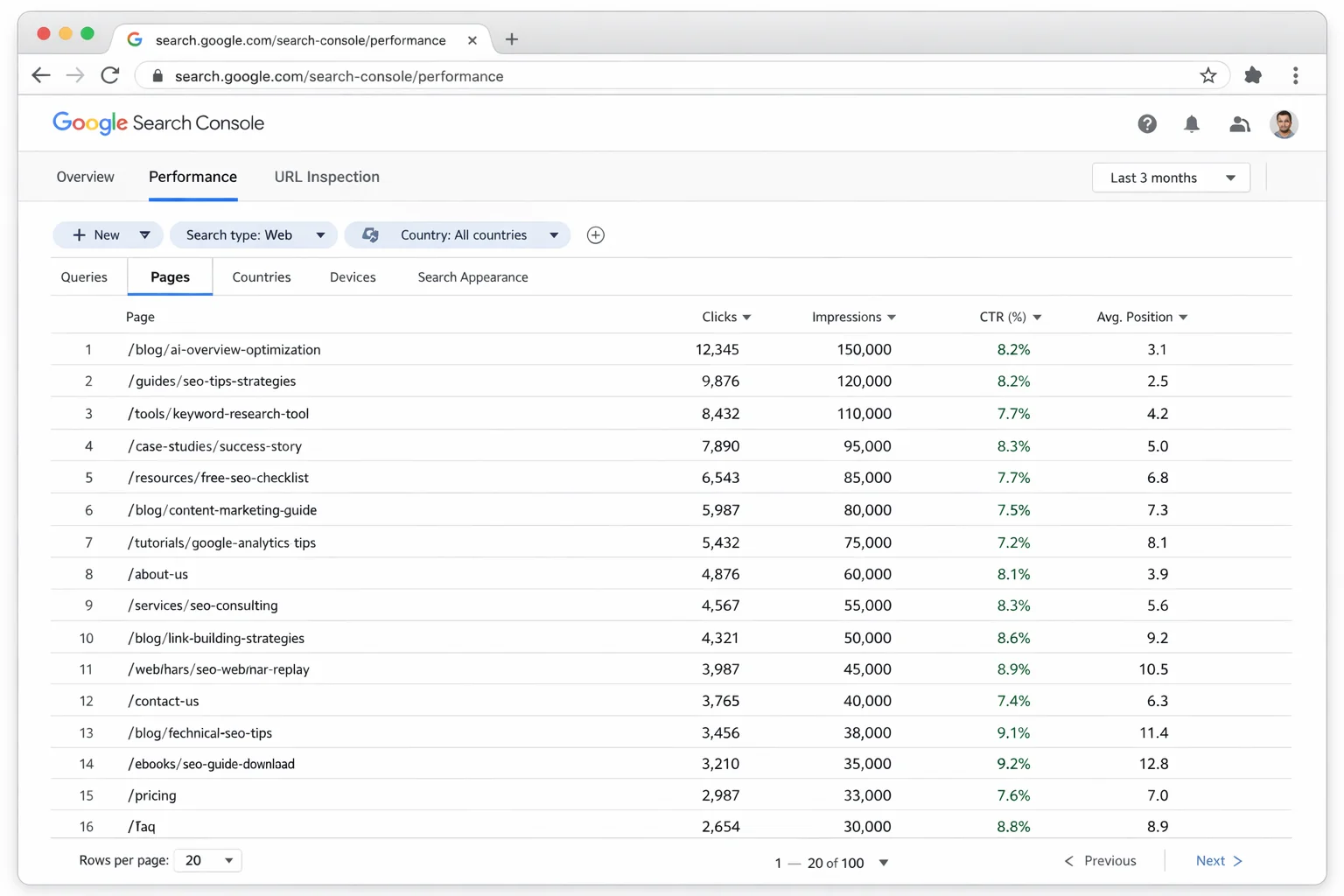
Step 1: Pull your top 20 pages by organic traffic.
Open Google Search Console. Go to Performance, then Search Results. Click the “Pages” tab. Sort by clicks (descending). These are your highest-traffic pages, the ones where a formatting upgrade will have the biggest impact.
Step 2: Check each page against the 6 citation patterns.
Open each page and score it against this checklist:
- Does the content lead with a direct answer within 2-3 sentences of each H2? (Yes/No)
- Are process explanations formatted as numbered steps? (Yes/No)
- Do definitions use the “bold definition + expansion” format? (Yes/No)
- Are comparisons in tables or structured lists? (Yes/No)
- Does the content use specific numbers instead of vague claims? (Yes/No)
- Are paragraphs 1-3 sentences with clear topic sentences? (Yes/No)
A page scoring 4/6 or higher is AI Overview ready. A page scoring 3/6 or lower needs a reformat.
Step 3: Reformat, don’t rewrite.
This is the critical distinction. You’re not changing what the content says. You’re changing how it’s structured. Take a 200-word paragraph explaining a process and break it into 5 numbered steps. Take a buried definition and move it to the first sentence of its section. Add specific numbers where you currently have vague language.
A full reformat of one page takes 15-20 minutes. For your top 20 pages, that’s about 5-6 hours of work total. The return on that time investment compounds every day the AI Overview exists.
Step 4: Add FAQ schema to your reformatted pages.
This is the accelerator. After reformatting, add FAQ structured data to each page. Pick the 3-5 most common questions the page answers and mark them up with FAQ schema.
FAQ schema doesn’t guarantee AI Overview citation. But it makes your content machine-readable in a way that Google’s AI explicitly supports. It’s a signal that says “this page contains structured answers to specific questions.”
The takeaway: Auditing existing content for AI Overview readiness takes 15-20 minutes per page. Score each page against the 6 citation patterns, reformat the structure, and add FAQ schema. Five hours of work across your top 20 pages can transform your AI Overview visibility.
The GSC Workflow for Finding Your AI Overview Queries
Here’s something most people don’t know: Google Search Console already tells you which of your queries trigger AI Overviews. You just have to know where to look.
The signal is hiding in your impression and CTR data.
Here’s exactly what to do:
Step 1: Open GSC Performance and filter for “Search appearance: AI Overviews.”
Starting in late 2025, Google added an AI Overviews filter to the Search Console Performance report. Click the “+ New” filter, select “Search appearance,” and look for “AI Overviews.” If this filter is available in your account, you can see every query where your page appeared in an AI Overview.
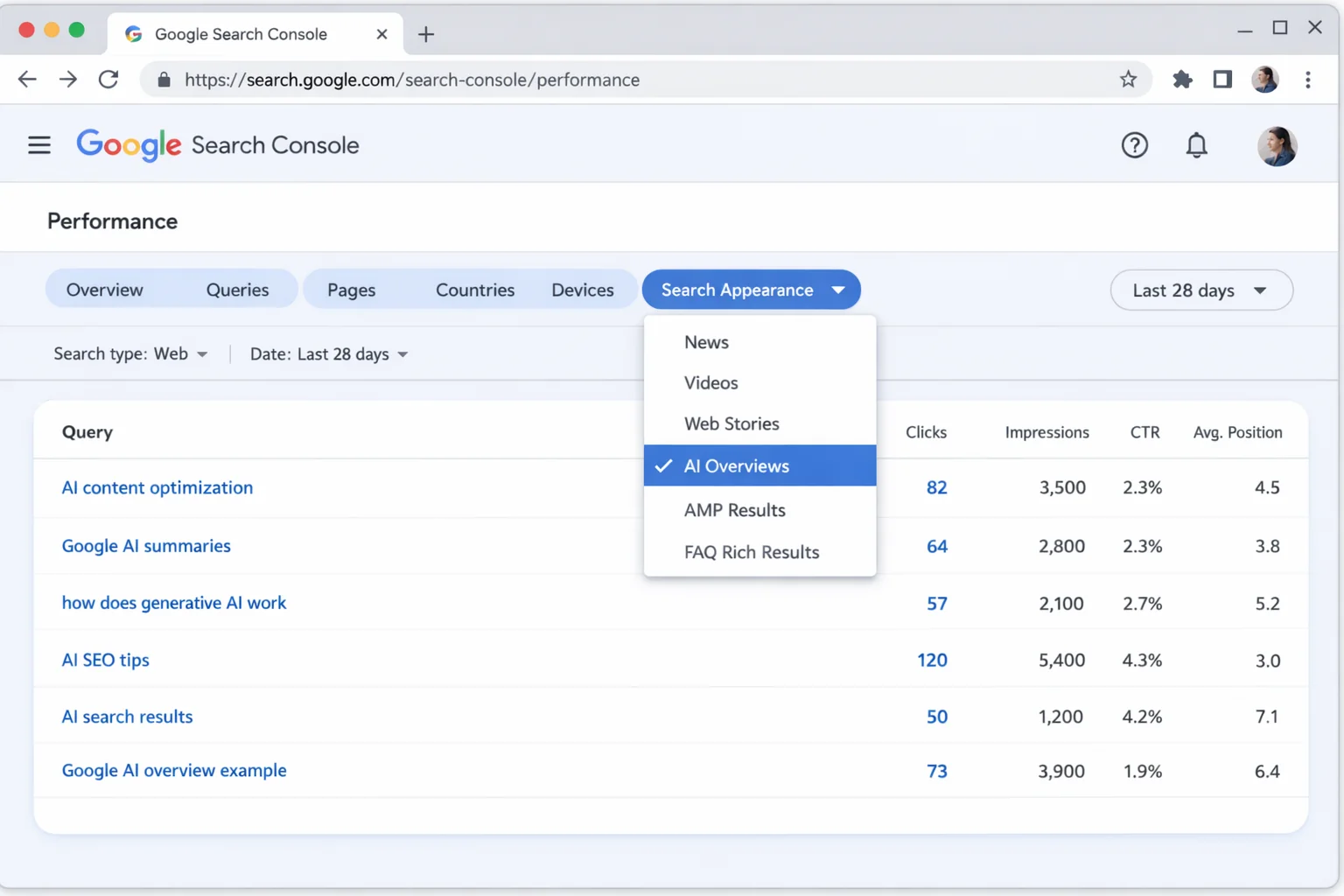
This is the direct method. It shows you exactly which queries your content was cited in. Export this list. These are your proven AI Overview keywords.
Step 2: If the AI Overview filter isn’t available, use the CTR proxy method.
Not every GSC account has the AI Overview search appearance filter yet. If yours doesn’t, use this workaround.
Filter your queries by the “how to,” “what is,” or comparison patterns (use the regex ^(how|what|why|which|best|vs|compare)[ ]). Then sort by impressions descending.
Look for queries with high impressions but unusually low CTR (below 2%). These are your AI Overview candidates. When an AI Overview appears for a query, it pushes organic results down and answers the question directly. Your page gets the impression (Google counted it) but the user never clicks because the AI answered them.
High impressions plus low CTR is the fingerprint of an AI Overview sitting above your organic result.
Step 3: Validate with a manual search.
Take your top 10 suspected AI Overview queries from Step 2. Search each one in Google (in an incognito window to avoid personalization). Note which ones actually show an AI Overview. Note whether YOUR page is cited in it.
This gives you three categories:
- Cited queries: You’re already in the AI Overview. Protect these pages. Don’t change their format.
- Visible but not cited: An AI Overview appears but your page isn’t in it. These are your highest-priority optimization targets.
- No AI Overview: The query doesn’t trigger one (yet). Focus on traditional SEO for these.
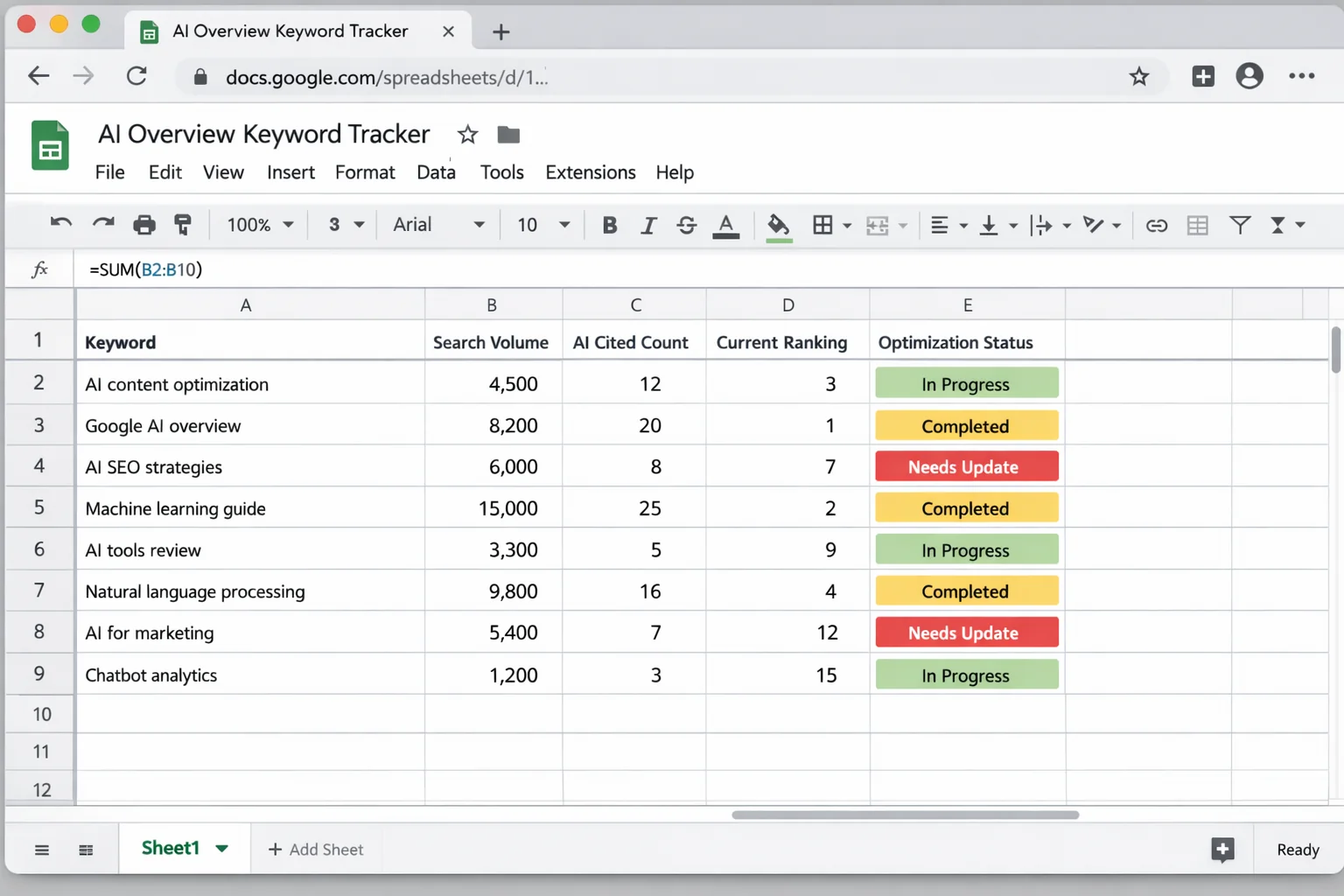
Step 4: Build your AI Overview keyword tracker.
Create a simple spreadsheet with columns: Query, Monthly Impressions, CTR, AI Overview (Yes/No), Cited (Yes/No), Page URL, Last Checked Date.
Update it monthly. This is your AI search optimization dashboard. No paid tool gives you this data specific to YOUR site. You’re building it from first-party GSC data.
The takeaway: Google Search Console already contains AI Overview data if you know how to extract it. Use the Search appearance filter (if available) or the high-impressions, low-CTR proxy method. Either way, you can build a complete picture of which queries trigger AI Overviews for your site.
Schema Markup That Makes Google’s AI Pick You
Structured data won’t guarantee you a spot in AI Overviews. But it dramatically improves your odds by making your content machine-readable in the formats Google’s AI prefers.
Here are the three schema types that matter most for AI Overview optimization:
FAQ Schema
FAQ structured data marks up question-and-answer pairs on your page. Add it to any page that answers 3 or more distinct questions. Use your GSC data to find the exact phrasing people type.
Implementation: add a JSON-LD script to the page head with @type: FAQPage and an array of Question objects. Each question contains a name (the question) and an acceptedAnswer with the text.
HowTo Schema
For process or tutorial content, HowTo structured data marks up each step as a discrete, parseable unit. This aligns perfectly with Pattern 2 (numbered step sequences) from the citation patterns above. The AI can pull individual steps or the entire sequence directly into an Overview.
Article Schema With Author Details
Standard Article schema (@type: Article) is baseline. For AI Overview optimization, include these properties that signal E-E-A-T through structured data:
authorwith@type: Personand a linked author pagedatePublishedanddateModifiedfor freshness signalsaboutwith a brief topic description for semantic classification
The combination of all three schema types creates a layered signal. You’re telling Google: “This page is a well-structured article by an identified expert, containing step-by-step instructions and answers to frequently asked questions.”
That’s EXACTLY what the AI looks for when building an Overview.
The takeaway: FAQ, HowTo, and detailed Article schema are the three structured data types that improve AI Overview citation. They make your content machine-readable in the exact formats Google’s AI prefers. Add them to every page you’ve reformatted with the 6 citation patterns.
Why Traditional Rankings Still Matter for AI Citations
Here’s something the “AI SEO is totally new” crowd gets wrong. Traditional ranking still matters for AI Overviews. According to Ahrefs’ research on AI Overview sources, the vast majority of cited sources come from pages already ranking on page 1.
The strategy is both layers working together. Traditional SEO (keyword targeting, backlinks, technical health, site authority) gets you into the top 10. AI Overview optimization (content formatting, schema markup, direct answer leads, numbered steps) gets you cited from the top 10.
If your page is on page 3, formatting won’t save you. The AI doesn’t dig that deep. But if you’re on page 1 and NOT getting cited, that’s purely a structure problem. The authority is there. Google just can’t easily extract a citable snippet from your content.
The takeaway: Get to page 1 first with standard SEO. Then reformat with the 6 citation patterns to get cited. Both layers compound together.
Track Your AI Overview Wins and Compound Them
AI Overview optimization is a compounding game. Every page you reformat correctly has a better chance of getting cited. Every citation sends a signal to Google that your site produces citable content. Over time, Google’s AI learns to trust your domain as a source.
Here’s how to build the feedback loop:
Monthly cadence (first Monday of every month):
- Open GSC. Check the AI Overview search appearance filter (or run the high-impressions, low-CTR proxy check)
- Update your AI Overview keyword tracker spreadsheet
- Compare to last month. Which new queries are you appearing in? Which ones did you lose?
- Reformat your next batch of 5-10 pages using the 6 citation patterns
- Add or update schema markup on reformatted pages
Quarterly review:
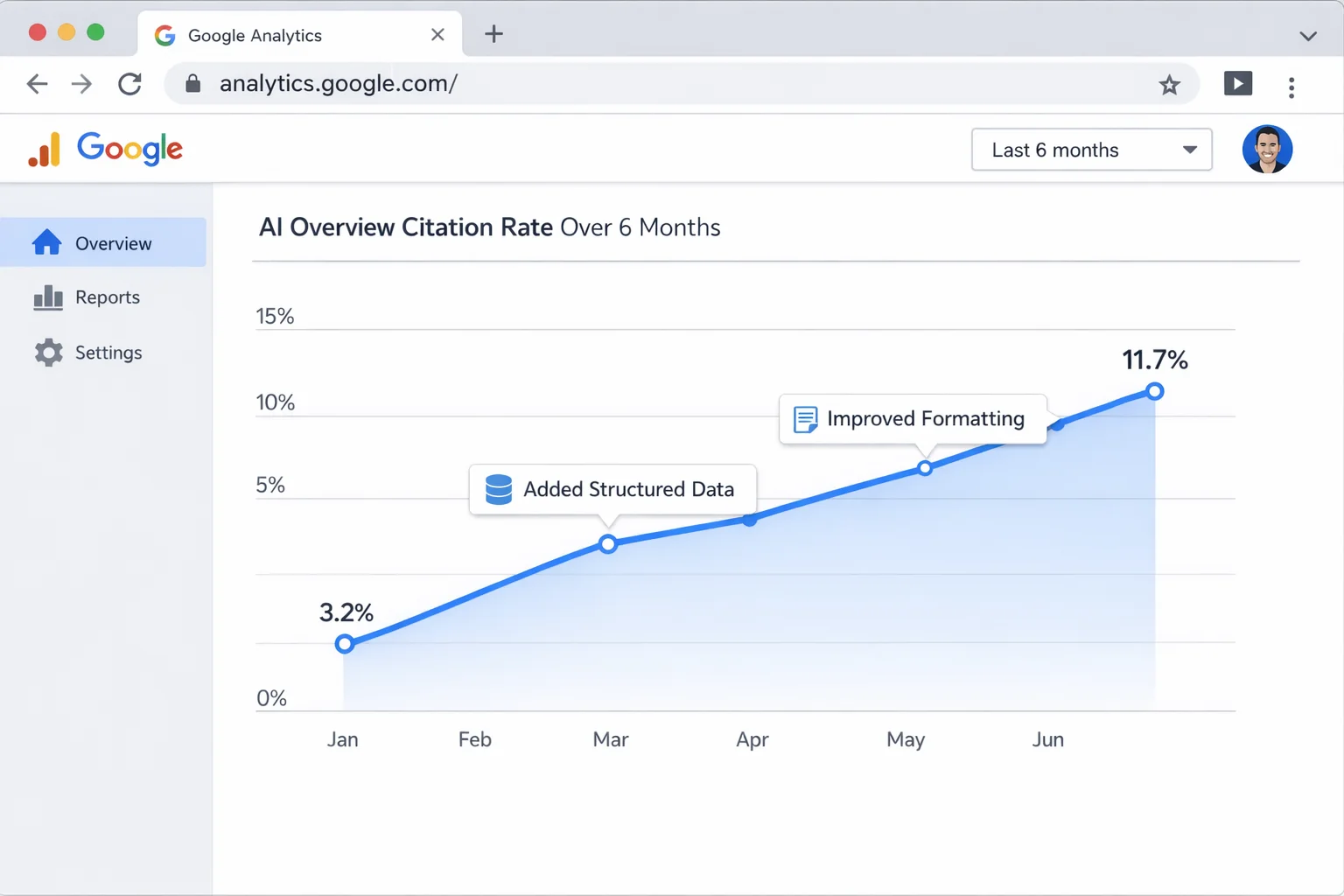
- Calculate your AI Overview citation rate: (queries with AI Overview citations) / (total queries with AI Overviews) = your citation rate
- Track this percentage over time. A healthy trajectory is 2-5% improvement per quarter
- Identify which content formats get cited most on YOUR site. Double down on those.
The sites that build this muscle now will have a MASSIVE compounding advantage. Google is adding AI Overviews to more query types every month. While your competitors publish 2,000-word posts formatted like it’s 2019, you’ll be publishing content specifically engineered to be cited by the most prominent feature on Google’s results page.
That’s the kind of edge that compounds for years.
Open your Google Search Console right now. Pull your top 20 pages. Score them against the 6 citation patterns. Reformat the first one today. Just one page, 15 minutes.
Then do the next one tomorrow. And the next one the day after.
The total time investment for your first full pass is about 8 hours. Two hours for the audit, five hours for reformatting 20 pages, one hour for schema. After that, the monthly upkeep is 1-2 hours. That’s 8 hours to position your site for the single biggest change to Google search in a decade.
Try this playbook this week and track your AI Overview citations next month. The results will speak for themselves.