Popup Conversion Rate Optimization for Ecommerce: How To Turn 24.90% of Visitors Into Buyers and Subscribers
TL;DR
The right ecommerce popup configuration converts at 24.90%, captures thousands of email subscribers, and drives direct sales on autopilot. Fullscreen popups outperform lightbox popups by 23.6% across 10,000+ Shopify stores, and gamification popups (spin-to-win) convert at 2x to 3x the rate of standard discount popups. This is the complete breakdown of which popup format, timing, discount structure, and mobile strategy produces the most revenue per visitor.
In This Post You’ll Learn
- Why fullscreen popups crush lightbox popups (with conversion data from 10,000 Shopify stores)
- The exact timing formula for triggering popups by page type and traffic source
- Gamification popups vs standard discount popups: head-to-head conversion data
- The discount vs no-discount debate and its real impact on revenue
- How to optimize popups for mobile without triggering Google’s interstitial penalty
- The step-by-step configuration that pulls all five elements together
A Spin-the-Wheel Popup Converted at 24.90% and Generated $129,526.20 in One Day
Most ecommerce popups convert between 2% and 4%.
That is the industry baseline. Two to four out of every 100 visitors give you their email or click your offer. If you are in that range, you are “normal.”
Normal is leaving money on the table.
Sumo’s “Cart Casino” popup, a gamified spin-to-win wheel offering tiered discounts, converted at 24.90% and generated 9,055 email opt-ins in a single day. Those opt-ins turned into $129,526.20 in annual recurring revenue. From one popup. In 24 hours.
And they are not alone.
Fanchest, one of the largest sports gift ecommerce brands, used a simple 10-second discount popup to capture 140,646 email subscribers and 6,573 direct product sales. No complicated funnel. No 12-step email sequence. One popup running on autopilot. EVERY. SINGLE. DAY.
These are not outliers. They are what happens when you get five specific variables right: format, timing, offer type, discount structure, and mobile optimization.
Here’s exactly what the data says about each one.
Why Fullscreen Popups Crush Lightbox Popups
The first decision every ecommerce store makes about popups is format. Lightbox (the small centered overlay), slide-in (the corner widget), or fullscreen (the full-page takeover).
Most stores default to lightbox. It feels “safer.” Less intrusive. Less likely to annoy visitors.
The data says that caution is costing you conversions.
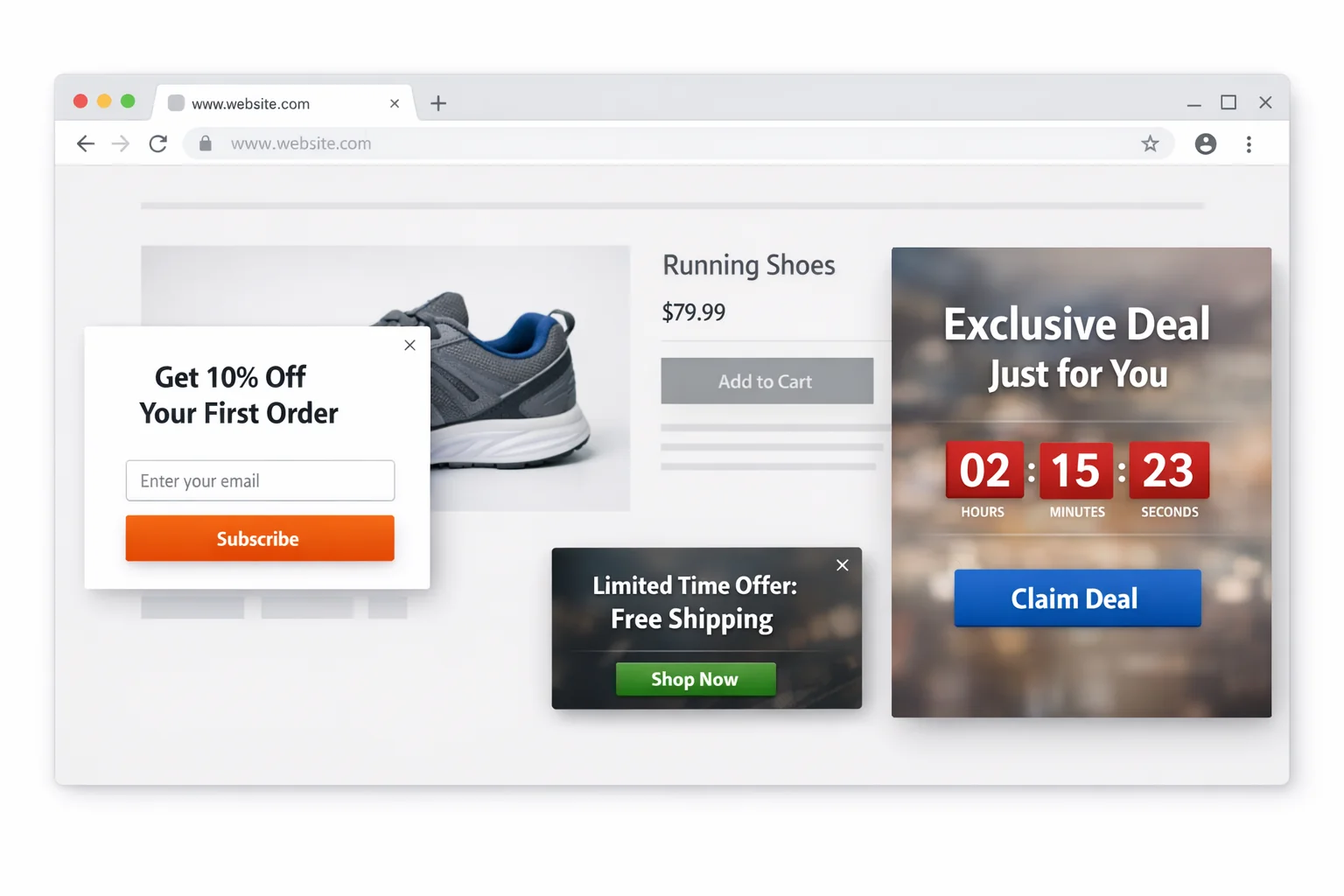
Recart analyzed data from over 10,000 Shopify stores and found that fullscreen popups convert 23.6% higher than lightbox popups. Not 23.6% conversion rate. A 23.6% lift over whatever your lightbox popup was already converting at.
If your lightbox converts at 3%, switching to fullscreen puts you at approximately 3.7%. At 10,000 monthly visitors, that is 70 extra email subscribers per month. At a $5 email subscriber value (conservative for ecommerce), that is $350 per month from changing one setting.
The reason is straightforward. Fullscreen popups eliminate distractions. When a lightbox popup appears, the visitor can still see the page behind it. Their eye wanders. They look for the X button. They click the overlay to dismiss.
A fullscreen popup demands a decision. Opt in or close. Nothing else competes for attention.
Slide-In Popups Have a Place (But It Is Narrow)
Slide-in popups convert lower than both lightbox and fullscreen. Typically 40-60% lower than lightbox, depending on placement and page type.
Their strength is not conversion rate. It is user experience on content-heavy pages like blog posts and educational guides. A slide-in in the bottom-right corner can capture emails without interrupting the reading experience.
Use slide-ins on blog content. Use fullscreen on product pages, collection pages, and the homepage. Match the format to the visitor’s intent on that specific page.
The takeaway: Fullscreen popups outperform lightbox by 23.6% across 10,000+ stores. The “less intrusive” choice is the lower-converting choice. Use fullscreen for commercial pages and slide-ins for content pages.
The Exact Timing Formula For Popup Triggers
Timing is where most ecommerce stores get popups wrong.
The default setting on most popup tools is “show after 5 seconds.” That is a guess. A bad one. The optimal trigger time depends on three variables: page type, traffic source, and visitor behavior.
Here’s exactly what to do:
By Page Type
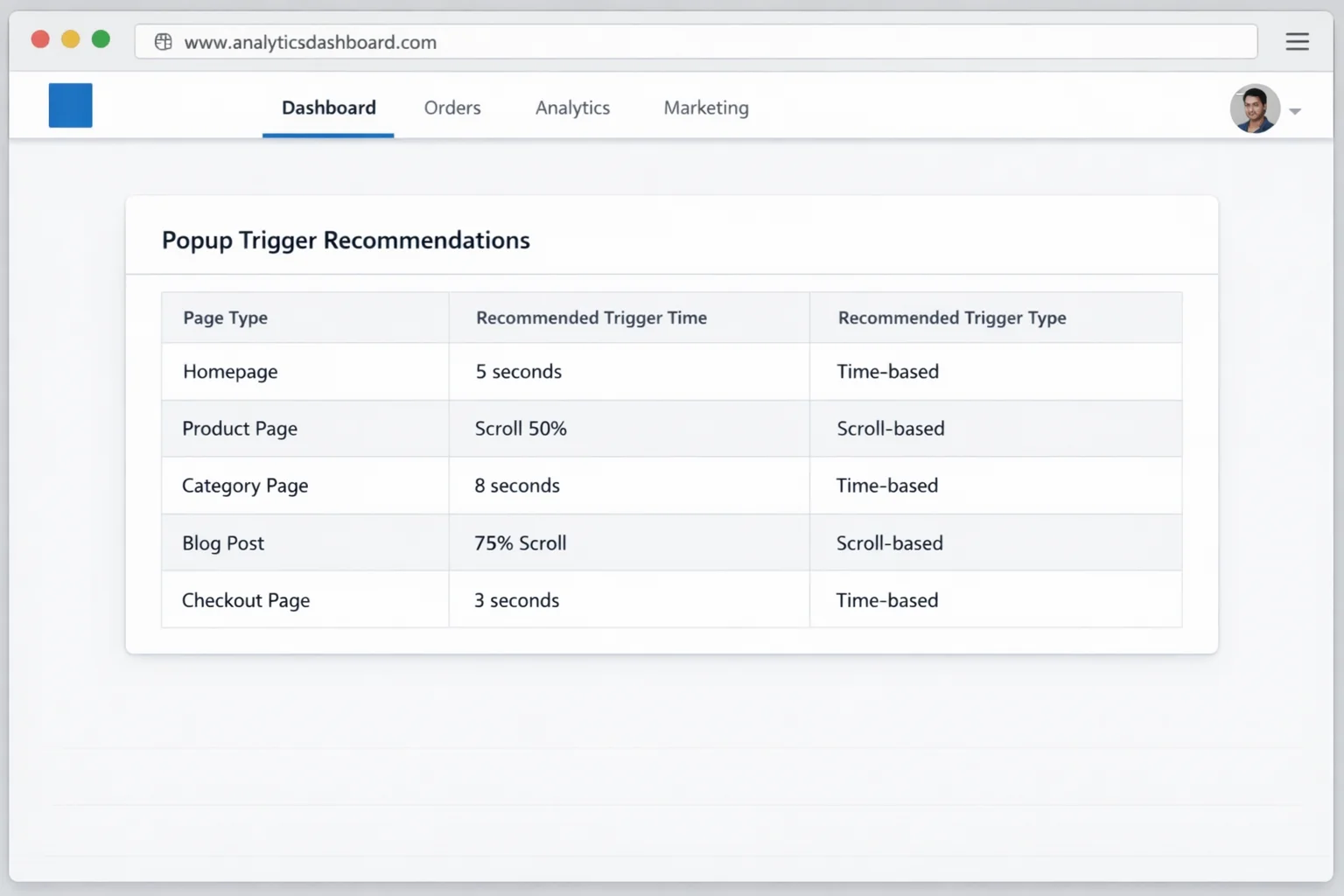
Homepage: 8-12 seconds. Homepage visitors are orienting. They are figuring out what you sell, scanning your hero image, and deciding whether to stay. Interrupting them in the first 5 seconds creates friction before trust is established. Give them 8-12 seconds to settle in.
Product pages: 25-35 seconds or 50% scroll depth. Product page visitors have intent. They came to look at a specific item. Let them engage with the product first (images, price, description). Then present the popup when they have consumed enough information to find a discount compelling.
Collection pages: 15-20 seconds. Collection page visitors are browsing. They are in discovery mode. A popup after 15-20 seconds catches them while they are still engaged but before they click through to a specific product (where your product page popup takes over).
Blog/content pages: 45-60 seconds or 60% scroll depth. Content readers need time to consume value before you ask for anything. Triggering a popup before they have read at least half the article feels like a bait-and-switch.
By Traffic Source
This is the variable almost nobody optimizes for.
Paid ad traffic (Google Ads, Meta Ads): Trigger faster. These visitors already know your offer. They clicked an ad with a specific promise. Show the popup at 5-8 seconds. They expect a deal. Give it to them immediately.
Organic search traffic: Trigger slower. Organic visitors are researching. They found you through a search query, and they want to evaluate before committing. Use the standard page-type timings above.
Social media traffic: Trigger at medium speed (10-15 seconds). Social visitors are curious but not committed. They clicked a link from Instagram or TikTok. Give them enough time to see if the page matches what they expected, then present the popup.
Email/returning visitor traffic: Do not show a popup at all. These people already gave you their email. Showing them a “Sign up for 10% off” popup when they are already on your email list is a bad experience. Suppress popups for returning visitors and email click-throughs using cookie targeting.
Exit-Intent: The Safety Net
Exit-intent popups fire when the visitor’s mouse moves toward the browser’s close or back button. They are your last chance to capture someone who is about to leave.
The average exit-intent popup converts at 2-4%. That sounds low, but remember: these visitors were about to leave with a 0% conversion probability. Getting 2-4% of abandoning visitors to opt in is pure upside.
Well-optimized exit-intent popups (strong headline, relevant offer, clean design) convert at 10-15%. The difference between 2% and 15% comes down to offer relevance and visual design, which the next two sections cover.
The takeaway: Stop using one timing rule for your entire site. Set page-specific triggers, adjust by traffic source, suppress for returning visitors, and always run an exit-intent popup as your safety net.
Gamification vs Discount Popups: Head to Head
This is the matchup every ecommerce marketer asks about. Standard discount popup (“Get 10% Off”) versus gamification popup (spin-the-wheel, scratch-off, pick-a-box).
The data is decisive. But the answer is more nuanced than “gamification always wins.”
The Conversion Rate Comparison
Standard discount popups with a clear offer (“Get 10% Off Your First Order”) convert at 5-8% when well-designed and properly timed. Poorly designed ones sit at 2-3%.
Gamification popups (spin-to-win wheels, slot machine animations, scratch-to-reveal discounts) convert at 12-25% in well-executed implementations. That Cart Casino popup that hit 24.90% is the high end, but 15-18% is consistently achievable with a good configuration.
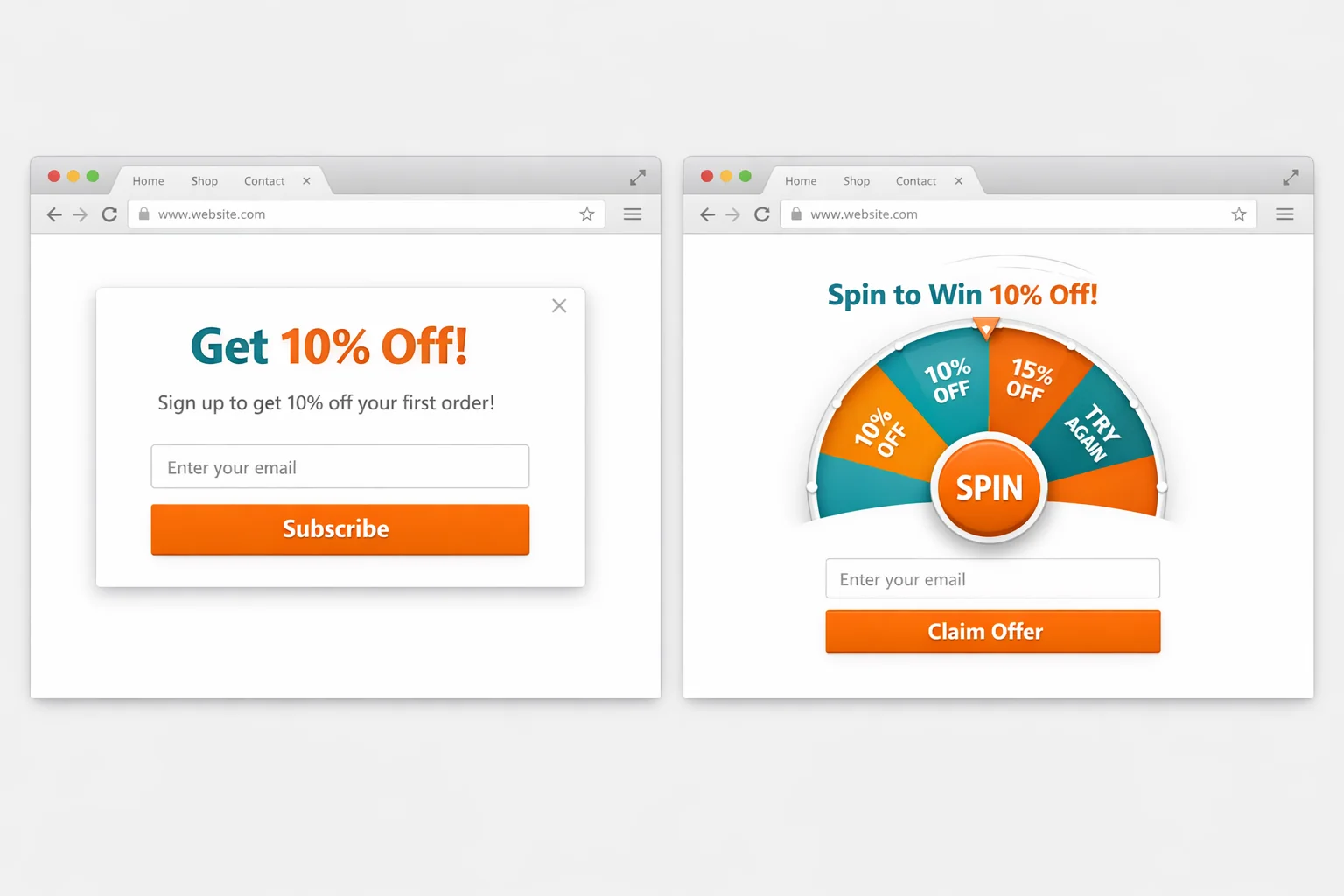
That is a 2x to 3x conversion rate lift from adding a game mechanic. The psychology is simple: variable rewards create dopamine anticipation. The visitor does not know which discount they will get, so the act of spinning feels like winning rather than receiving.
But Conversion Rate Is Not Revenue
Here’s where most articles stop. “Gamification converts higher. Use gamification. Done.”
Hold on.
Conversion rate measures how many people interact with the popup. It does not measure how many people buy or how much they spend.
A gamification popup that offers 5%, 10%, 15%, 20%, and 50% off as wheel segments creates a problem. The visitor who lands on 5% off feels like they lost. They had the possibility of 50% off and got 5%. Psychologically, that is a loss, not a win. Those visitors redeem at significantly lower rates than visitors who receive a flat 10% off from a standard popup.
The visitors who land on the big discounts (30-50% off) redeem at high rates but eat into your margins.
Here’s exactly what to do to get the best of both worlds:
-
Set the wheel segments to a narrow range. Use 10%, 12%, 15%, and 18% as your four discount tiers. Every spin feels like a real win because even the “worst” outcome is a solid discount. The best outcome does not destroy your margins.
-
Weight the probabilities. Set 10% as a 40% probability, 12% as a 30% probability, 15% as a 20% probability, and 18% as a 10% probability. Your average discount given is approximately 12%. Close to what a standard 10% popup would offer, but with 2x to 3x the opt-in rate.
-
Set a minimum order threshold. “Spin for your discount. Valid on orders over $50.” This protects your average order value and prevents discount stacking on low-value carts.
The takeaway: Gamification popups convert at 2x to 3x the rate of standard discount popups. But you need to control the discount range (keep it narrow), weight the probabilities toward the lower tiers, and set minimum order values to protect revenue.
The Discount vs No-Discount Revenue Debate
Some ecommerce operators refuse to discount. Period. They believe discounts train customers to wait for sales, erode brand perception, and reduce lifetime value.
They are partially right.
A 10% discount popup that converts at 7% and generates a $60 average order value produces $4.20 of revenue per popup interaction. A content upgrade popup (“Get Our Free Style Guide”) that converts at 4% and generates a $75 average order value (no discount, so full margin) produces $3.00 of revenue per popup interaction.
The discount popup wins on immediate revenue per interaction.
But the calculation shifts when you factor in customer lifetime value.
Customers acquired through discount popups have a 15-25% lower repeat purchase rate than customers acquired through content or brand-driven popups. They were trained from the first interaction that your brand offers discounts. They wait for the next one.
So which should you use?
The Revenue-Maximizing Framework
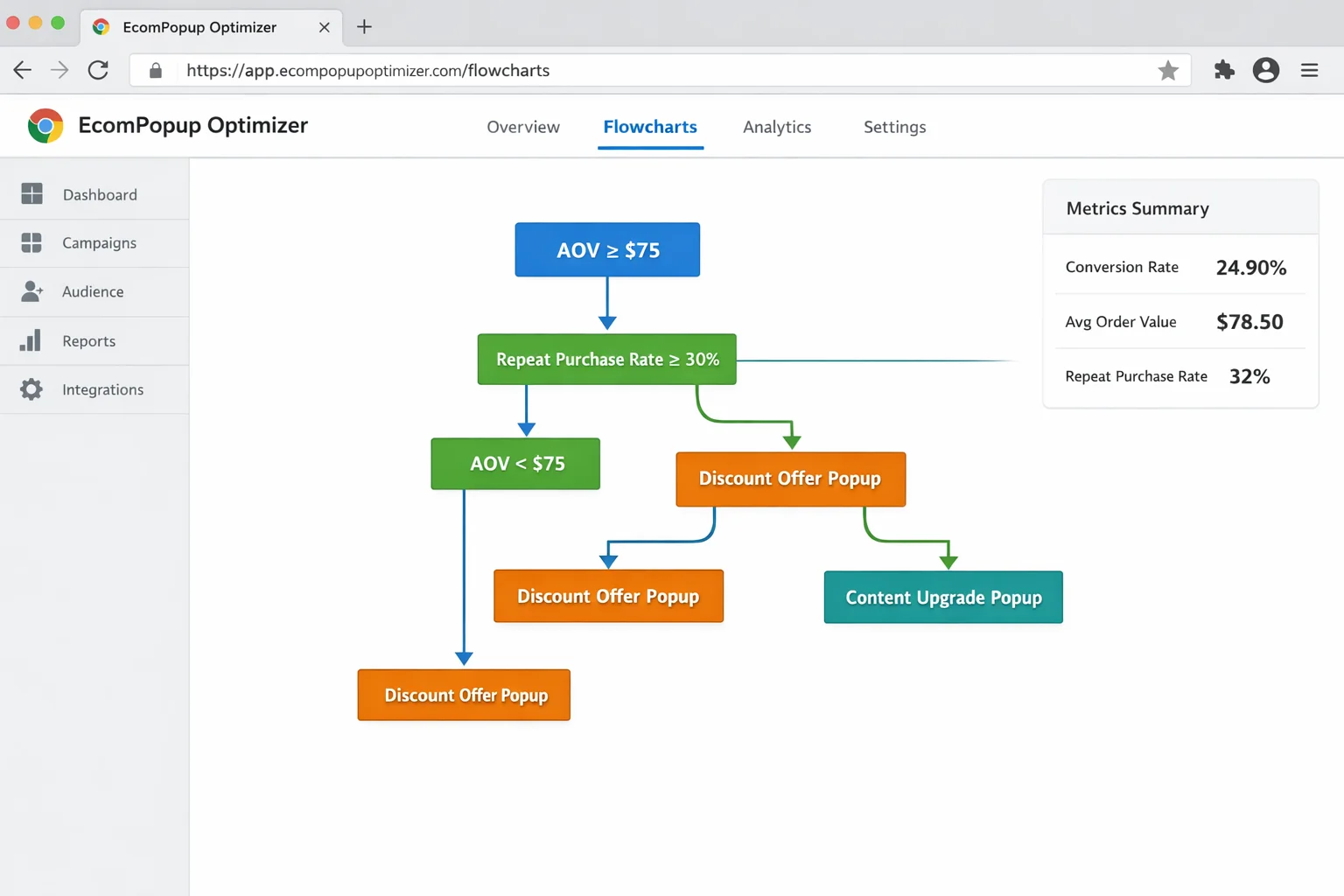
For stores with an average order value under $75 and a repeat purchase rate under 20%, use discount popups. Your customers are transactional. Discounts accelerate the decision without meaningfully impacting lifetime value because the repeat rate is already low.
For stores with an average order value above $100 and a repeat purchase rate above 30%, use content upgrade popups or “early access” popups. Your customers value the brand and come back. Protecting that brand perception is worth the lower popup conversion rate.
For stores in between, run both. Show discount popups to first-time visitors from paid ads (already deal-seeking) and content upgrade popups to organic visitors (research-mode, higher intent). Segment by traffic source, as described in the timing section above.
There is a middle ground that works surprisingly well: the “mystery discount” popup. Instead of stating “Get 10% Off,” the popup says “Unlock Your Mystery Discount.” The visitor enters their email to reveal the discount amount.
This combines the engagement of gamification with the simplicity of a standard popup. Conversion rates on mystery discount popups run 8-12%, placing them between standard discount (5-8%) and full gamification (12-25%).
The takeaway: Discounts maximize short-term revenue per popup interaction. Content upgrades protect long-term customer value. Segment your popup strategy by traffic source and customer economics. The “mystery discount” is an effective middle ground.
Mobile Popup Optimization Without the Google Penalty
In January 2017, Google started penalizing websites that show intrusive interstitials on mobile. Full-page popups that cover the main content on mobile devices can trigger a ranking demotion.
Most ecommerce stores responded by either disabling popups on mobile entirely (leaving massive revenue on the table) or ignoring the policy (risking organic rankings).
Both are wrong.
Google’s policy has specific exemptions and nuances that allow you to run high-converting mobile popups without penalty.
What Google Actually Penalizes
Google penalizes interstitials that appear before the user has interacted with the page from organic search results. The key words: “before interaction” and “from organic search.”
This means:
- Popups triggered by user action (scroll, click, time on page) are not penalized. A popup that fires after 15 seconds or 50% scroll is a user-initiated interaction response, not an intrusive interstitial.
- Popups shown to visitors from paid ads, social media, or direct traffic are not subject to the organic search penalty. The rule applies only to the organic search landing experience.
- Small banners that use a “reasonable amount of screen space” are exempt. Google’s guidelines specifically allow banners that do not cover the majority of the screen.
The Mobile Popup Configuration That Converts
Here’s exactly what to do for mobile popups:
-
Use a bottom banner (not a fullscreen overlay) for visitors from organic search. A banner that covers the bottom 15-20% of the screen is compliant with Google’s policy and still captures attention. Keep the headline to 5-7 words, one email field, and one CTA button.
-
Use fullscreen popups for visitors from paid ads, social, and direct traffic. These visitors are not subject to the organic search penalty. Give them the high-converting fullscreen experience.
-
Set a minimum time delay of 10 seconds on all mobile popups. This ensures the popup fires after user interaction, which satisfies Google’s “before interaction” criterion.
-
Make the close button large and obvious. Google specifically flags interstitials that are “difficult to dismiss.” A clearly visible X button in the top-right corner (minimum 44x44 pixels, the standard tap target size) keeps you compliant.
-
Suppress the popup on the first pageview for organic visitors and trigger it on the second pageview or on exit-intent. This is the safest approach. The visitor sees your landing page clean, browses to a second page, and then sees the popup. Google’s penalty targets the initial landing experience.
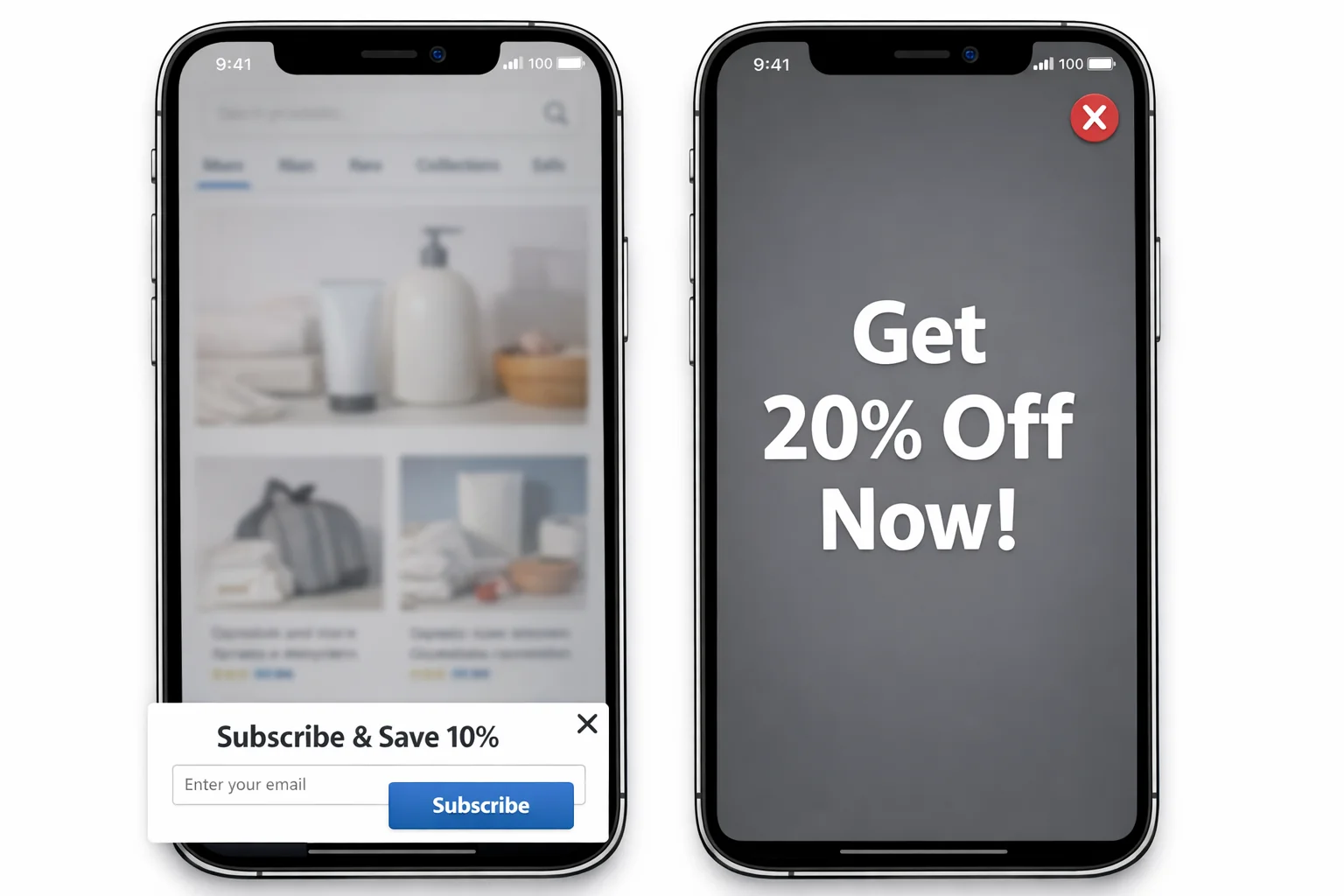
Over 60% of ecommerce traffic is mobile. Disabling popups on mobile means ignoring the majority of your visitors. The configuration above lets you capture mobile email subscribers while staying on Google’s good side.
The takeaway: Do not disable mobile popups. Use bottom banners for organic search traffic, fullscreen for all other sources, set a 10-second minimum delay, and make the close button 44x44 pixels. You stay compliant and keep converting.
The Complete Popup Configuration Playbook
You now have the data on format, timing, offer type, discount structure, and mobile optimization. Here is how to put all five together into one cohesive system.
Here’s exactly what to do:
Step 1: Set Up Your Fullscreen Desktop Popup
Create a fullscreen popup with these specifications:
- Headline: 5-8 words. Lead with the benefit. “Spin to Unlock Your Exclusive Discount” or “Get 15% Off Your First Order.”
- Subheadline: One sentence explaining what they get and why.
- Email field: Single field. Do not ask for name, phone number, or anything else at this stage.
- CTA button: Contrasting color from your site background. Benefit-driven copy like “Unlock My Discount” or “Spin the Wheel.”
- Close button: Visible X in the top-right corner. Do not hide it or make it tiny.
Step 2: Configure Page-Specific Timing
Set different trigger rules for each page type:
- Homepage: 10-second time delay
- Collection pages: 15-second time delay
- Product pages: 30-second time delay or 50% scroll depth (whichever comes first)
- Blog pages: 50-second time delay or 60% scroll depth
Step 3: Add Traffic Source Segmentation
Most popup tools (Klaviyo, Privy, Justuno, OptiMonk) allow URL parameter targeting. Use it.
- Visitors with UTM parameters containing “paid” or “cpc”: Reduce all time delays by 50%. These visitors expect offers.
- Visitors from email campaigns (utm_medium=email): Suppress the popup entirely.
- Returning visitors (cookie-based): Suppress the popup or show a different offer (“Welcome Back. Free Shipping on Your Next Order”).
Step 4: Set Up Your Mobile Variant
Duplicate your popup and create a mobile-specific version:
- For organic search visitors: Convert the fullscreen to a bottom banner covering no more than 20% of the screen.
- For all other traffic sources: Keep the fullscreen format.
- Set minimum 10-second delay on all mobile popups.
- CTA button and close button: both minimum 44x44 pixels.
Step 5: Add Your Exit-Intent Backup
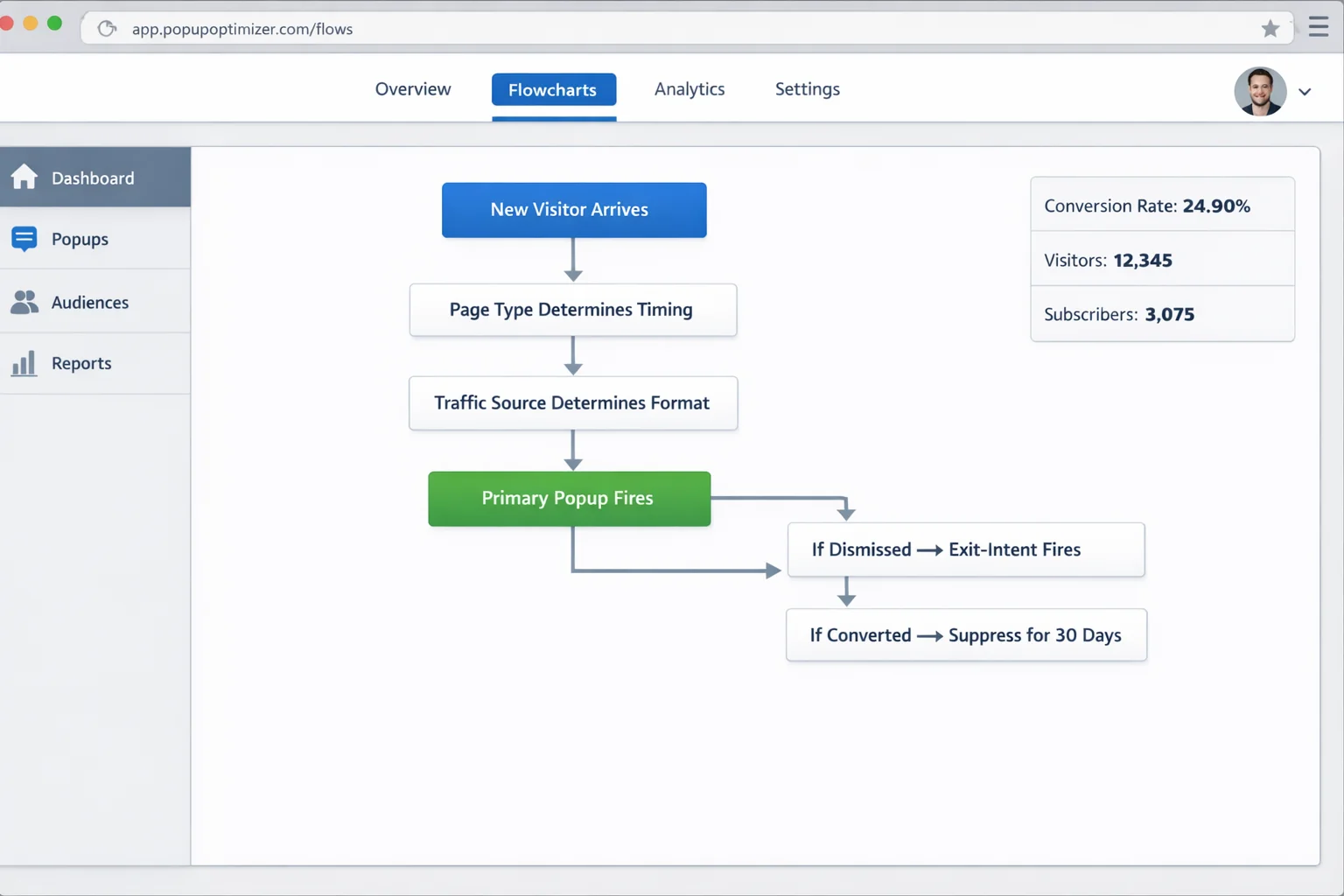
Create a second popup that fires on exit-intent only. This catches everyone who did not convert on the first popup.
- Desktop: Standard mouse-to-browser-bar exit detection.
- Mobile: Back-button press or scroll-up-fast behavior (most popup tools detect this).
- Offer escalation: If your primary popup offers 10% off, your exit-intent popup offers 15% off. Give the leaving visitor a reason to reconsider.
Step 6: Set Frequency Rules
- Show the primary popup once per session. If they dismiss it, do not show it again on the next page.
- Show the exit-intent popup once per session, only if the primary popup was dismissed.
- After conversion (email captured), suppress ALL popups for 30 days. Use cookies or your popup tool’s built-in suppression.
Why This System Works
Three forces compound when you run this configuration.
First, format matching. Fullscreen on commercial pages captures maximum attention. Slide-ins on content pages respect the reading experience. Mobile banners for organic search stay compliant. Every visitor sees the right format for their context.
Second, timing alignment. Paid traffic visitors get the offer fast because they are ready for it. Organic visitors get time to build trust. Blog readers get time to consume value. The popup arrives at the moment of maximum receptivity for each visitor type.
Third, offer escalation. The primary popup makes the initial offer. The exit-intent popup sweetens the deal for visitors who said no the first time. You get two chances to convert every visitor, with the second chance carrying a stronger incentive.
Most ecommerce stores run a single popup with a single timing rule for their entire site. They are leaving 30-50% of their potential popup conversions on the table by ignoring these three forces.
The average well-optimized popup converts at 5-8%. Stores running page-specific timing, traffic source segmentation, and format matching consistently hit 10-15%. Add gamification and the ceiling moves to 20%+.
Your Popup Revenue Calculator
Here is the math that makes this real.
Take your monthly unique visitors. Multiply by your popup view rate (typically 60-70% of visitors see the popup, depending on trigger timing). Multiply by your conversion rate. Multiply by your average revenue per email subscriber over 90 days.
Example: 50,000 monthly visitors x 65% popup view rate x 12% gamification conversion rate x $8 revenue per subscriber = $31,200 in attributable popup revenue per quarter.
Compare that to the same store running a basic lightbox with default timing: 50,000 x 55% view rate x 4% conversion rate x $8 = $8,800 per quarter.
That is $22,400 per quarter left on the table. $89,600 per year. From popup configuration alone.
Go Spin Up Some Revenue
You have the format data. You have the timing formula. You have the gamification playbook and the mobile compliance rules.
The stores converting at 15-25% with their popups are not using magic. They are using fullscreen formats, page-specific triggers, traffic source segmentation, and gamification mechanics. All configurable in any modern popup tool in a single afternoon.
Pick one variable from this guide. Test it this week. Measure the lift. Then stack the next one.
Too easy.